




- MyRepublic
Ever tried to squad up with your friends, only to get hit with connection errors, weird voice chat issues, or painfully long matchmaking times? Yeah… same.
Most of the time, the culprit isn’t your skill issue. It’s your NAT.
In this guide, we break down what is a NAT, the different NAT types, and how network address translation affects your gaming experience. We’ll also show you how to fix it.
What is a NAT?
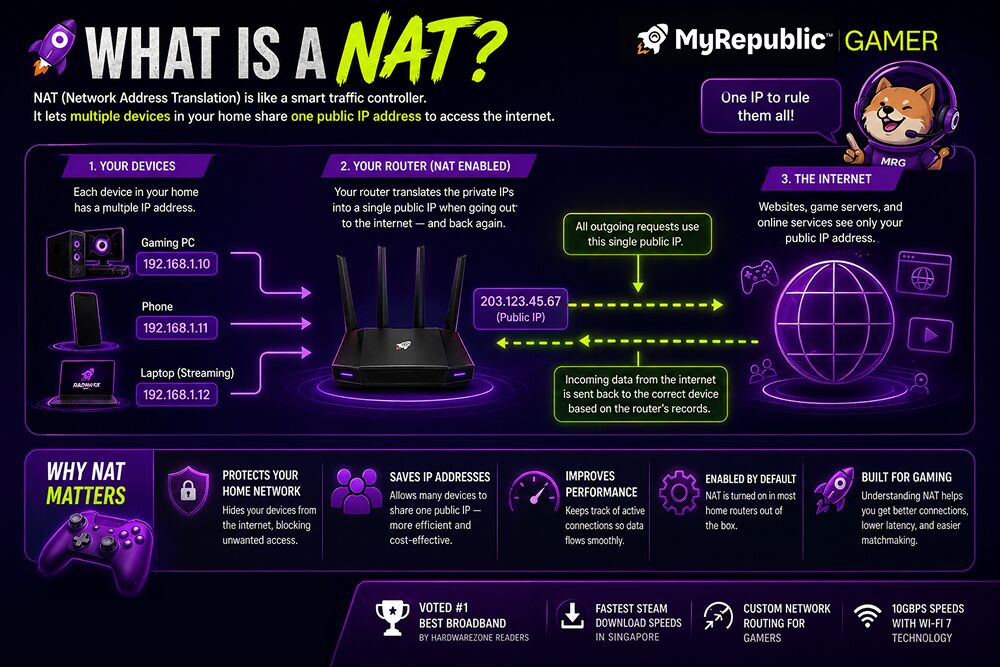
A NAT, or Network Address Translation lets multiple devices in your home share one internet connection.
Think of NAT like a security guard at your home network’s front door. Every time data comes in or out, it checks where it’s supposed to go.
- Your home devices (PC, console, phone) each get a private IP address
- Your router uses one public IP address to talk to the internet
- NAT translates traffic back and forth so the right data reaches the right device
Without NAT, every device in your home would need its own public IP. That’s not practical, and it’s also less secure.
Why does this matter for gaming? NAT doesn’t just organise traffic. It also decides what is allowed in. If your router blocks certain incoming connections, your game may struggle to connect to other players.
What are NAT types?
NAT types determine how easily your device can connect to other players online.
Different NAT types exist because routers handle incoming connections differently. Some are more open, while others are stricter for security reasons.
In gaming, NAT types are usually grouped into three categories. These categories tell you how “friendly” your network is when connecting to other players.
Open NAT (Type 1 / Type A)
Ultimately, this is the best NAT for gaming. No restrictions.
Open NAT means your network allows incoming and outgoing connections freely. Your console or PC can communicate with almost anyone.
- You can join and host games easily
- You can connect to players with any NAT type
- Peer-to-peer connections work smoothly
This is especially important for games that rely on player-to-player connections instead of dedicated servers.
If you’re playing competitive games, Open NAT removes one major source of frustration. No weird connection errors, no failed invites, no unnecessary delays.
Moderate NAT (Type 2 / Type B)
In terms of gaming, it’s playable, but not perfect.
Moderate NAT allows most outgoing connections, but restricts some incoming ones.
- You can connect to players with Open NAT easily
- You may struggle to connect to players with Strict NAT
- Hosting games can be inconsistent
This is why sometimes your game works fine, and other times it suddenly refuses to connect to your friend’s lobby.
Moderate NAT is very common because it balances security and usability. It’s not broken, but it’s not ideal for gamers who want a seamless experience.
Strict NAT (Type 3 / Type C)
Strict NAT may have it’s time and place, but it’s the worst for gaming.
Strict NAT blocks most incoming connections unless they were specifically requested by your device.
In simple terms, your network is very cautious. It does not trust incoming traffic easily.
- Difficulty connecting to most players
- Inability to join certain lobbies
- Frequent matchmaking failures
Strict NAT users can usually only connect to players with Open NAT. If two Strict NAT players try to connect, it often fails completely.
That’s why it feels like your game is broken. It’s not the game. It’s your network refusing connections.
How do NAT types affect matchmaking?

The stricter your NAT, the fewer players you can connect to.
When you queue for a match, your game tries to find other players it can connect to. If your NAT is open, your connection options are wide. You can match with almost anyone.
If your NAT is strict, your options shrink significantly. The game has to filter out players your network cannot connect to.
- Longer matchmaking times
- Smaller player pools
- Higher chance of failed connections
For games like Warzone, FIFA, or GTA Online, this can mean waiting longer just to get into a match. Sometimes, you might not find one at all during off-peak hours.
Does NAT affect latency (ping)?
No, NAT does not directly impact your latency or ping. However, it still impacts your overall experience.
Ping is mainly affected by distance to the server and network routing. NAT does not directly increase your ping number. What NAT does do is affect how connections are established.
- You might be forced to connect through less optimal peers
- You may fail to connect to the best host or server
- You could experience more unstable sessions
So even if your ping looks fine, your gameplay can still feel inconsistent.
- Open connectivity (good NAT)
- Efficient paths to servers (good routing)
If you’re using a provider with custom network routing for gaming, like MyRepublic’s Gamer Broadband, your traffic is prioritised for faster, more direct routes to game servers. That means less detours, lower latency, and more stable matches. If you want to go deeper into how this impacts gameplay, check out our ultimate guide to gaming latency.
How do I check my NAT type?
You can check your NAT type in your console or game network settings.
Most platforms test your connection and display your NAT type automatically.
- PlayStation: Settings > Network > View Connection Status
- Xbox: Settings > Network > Network Settings
- PC: Usually shown inside the game’s network settings
When you run the test, your system attempts to contact external servers and determines how restrictive your network is.
If you see “Strict” or “Moderate,” it means your router is limiting certain connections.
So, How do I get an Open NAT?
To get an Open NAT, Use UPnP, port forwarding, or a static IP.
To improve your NAT type, you need to allow your device to accept incoming connections more easily.
1. Enable UPnP
The easiest fix for an Open NAT is to Engable UPnP, or Automatic port management.
UPnP lets your devices request the router to open ports automatically when needed. Instead of manually configuring anything, your console or game tells the router what it needs.
- It requires minimal setup
- It adjusts dynamically for different games
- It suits most home users
If your router supports UPnP, this should be your first step.
2. Use port forwarding
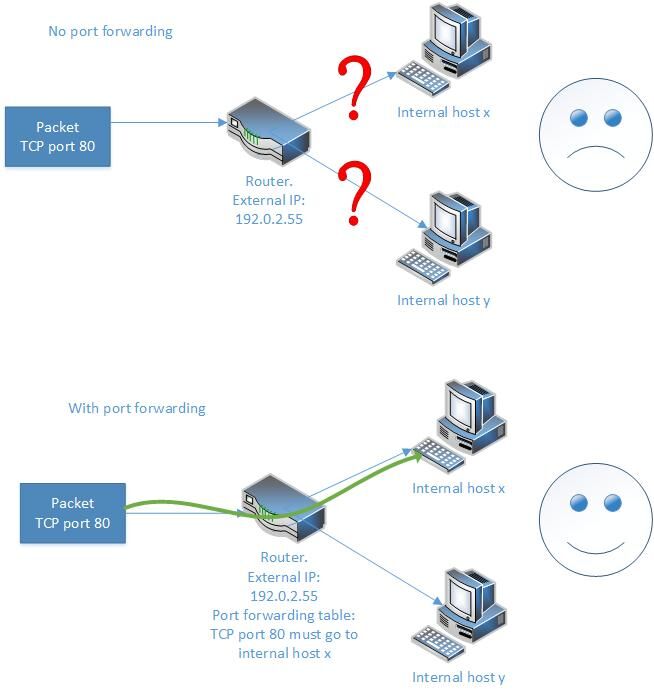
Port forwarding manually opens the “doors” your game needs.
Port forwarding is more hands-on. You tell your router exactly which ports to keep open for specific devices. Think of ports as numbered doors. By default, most of them are closed for security.
- You permanently open a specific door
- You direct incoming traffic to a specific device
This improves connection reliability, especially for games that rely heavily on peer-to-peer networking.
It takes more setup, but it gives you more control.
3. Use a static IP
A Static IP helps to keep your setup consistent and reliable.
A static IP ensures your device always uses the same internal address within your home network.
- Port forwarding rules rely on a fixed IP
- If your device IP changes, your rules stop working
With a static IP, your configuration stays consistent. No need to redo settings every time your router resets.
If you want a smoother setup, MyRepublic offers a Static IP add-on. If you’re not sure what that means, here’s a simple breakdown of what a static IP is and when you actually need one.
4. Avoid double NAT
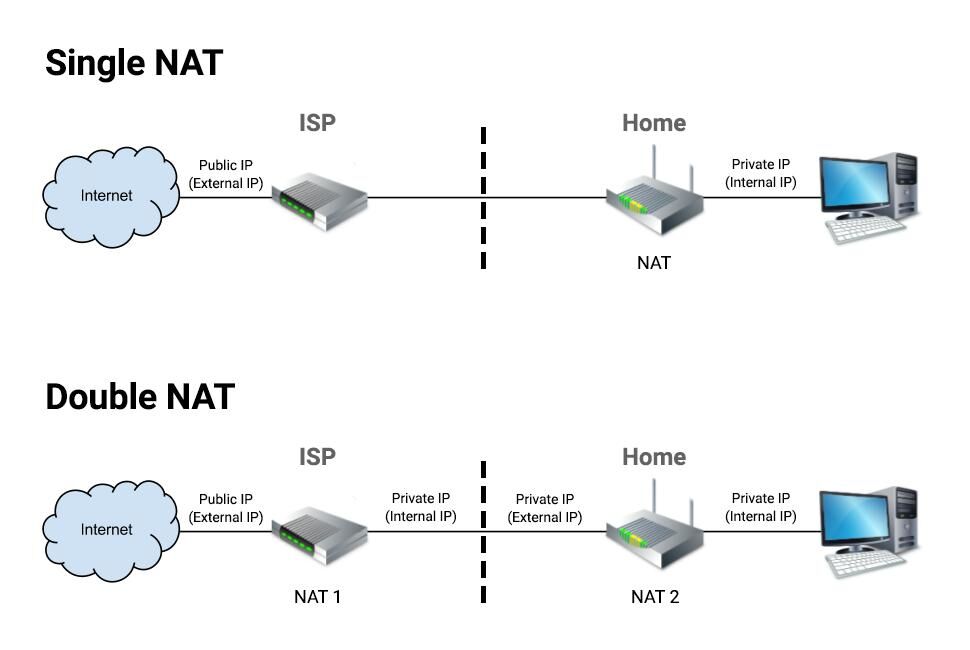
All this talk about NAT, but there is such a thing as too much. Too many routers equals too many restrictions.
Double NAT happens when two devices are performing network address translation at the same time.
- Your ISP provides a router (ONR)
- You connect your own router to it
Now both devices are filtering traffic. This creates extra barriers for connections.
- Enable bridge mode on one device
- Use only one router for routing
Reducing layers of NAT makes your connection more open and predictable.
Any other tips to improve gaming performance outside of NAT?
Yes. Your setup matters as much as your NAT.
Even with a good NAT type, poor network setup can still ruin your experience.
- Use wired connections for lower latency and stability
- Place your router properly to reduce interference
- Upgrade to newer routers that handle multiple devices better
- Use mesh systems if your home has dead zones
If you’re in a larger home, solutions like HaloHome ensure consistent coverage across every room. No more random lag spikes just because you moved from your room to the living room.
TL;DR
- NAT (network address translation) controls how your devices connect online
- Open NAT gives you the best experience
- Strict NAT leads to connection issues and long matchmaking times
- UPnP and port forwarding can fix most problems
- Good routing and low latency broadband matter just as much
Don’t Let NAT Ruin Your Rank
At the end of the day, NAT is just one piece of the puzzle. It’s a big one.
- Low latency
- Stable connections
- Fast matchmaking
That’s where a proper gaming network makes the difference. MyRepublic’s Gamer Broadband is built with custom routing, ultra-low latency, and top-tier international connectivity, so you spend less time troubleshooting and more time winning.
Because the only thing that should be holding you back is your aim, not your internet.
