




- MyRepublic
Wi-Fi 8 is the next generation of Wi-Fi, currently being developed under the IEEE 802.11bn standard. But unlike previous generations, the big story isn’t simply faster peak speeds. Wi-Fi 8 is being designed with a greater focus on reliability, lower and more consistent latency, stronger performance in congested environments, and better connections as more devices compete for bandwidth.
So, what will Wi-Fi 8 actually change? And more importantly, should you be doing anything to prepare for it? In this guide, we’ll look at how Wi-Fi 8 compares with Wi-Fi 7, the improvements it’s expected to bring, when it could arrive, device compatibility, and what it could mean for gaming, streaming and increasingly connected smart homes.
We’ll also look at whether it’s worth waiting for Wi-Fi 8 before upgrading and what you can do today to build a home network that’s ready for what’s next.
What Is Wi-Fi 8?
Wi-Fi 8 is the soon-expected, next major generation of Wi-Fi based on the IEEE 802.11bn standard. Its technical focus is known as Ultra High Reliability (UHR), reflecting a shift towards making wireless connections perform more consistently in the real-world environments where we actually use them.
That’s increasingly important as home networks become busier. A typical household may now have phones, laptops, TVs, game consoles, security cameras, smart speakers and other connected devices all sharing the same network, while neighbouring Wi-Fi networks compete for the same wireless spectrum.
Rather than simply chasing a new maximum speed, Wi-Fi 8 is being developed to make better use of the connectivity already available. The goal is to improve how reliably devices communicate, particularly when networks are congested, devices are moving around, or signal conditions aren’t ideal.
That makes Wi-Fi 8 somewhat different from the generational upgrades many of us are used to. The improvements may be less about seeing a dramatically bigger number on a speed test and more about your Wi-Fi connection performing consistently when and where you need it.
When is the Wi-Fi 8 Release Date?
Wi-Fi 8 may still be under development, but the first Wi-Fi 8 hardware is already beginning to arrive.
TP-Link unveiled its first Wi-Fi 8 product lineup at IFA 2026, including the Archer 8 Ultra router and Deco 8 Ultra Mesh Wi-Fi system. Regional pre-orders for the Archer 8 Ultra are scheduled to begin from 30 September 2026, making Wi-Fi 8 more than just a technology on the distant horizon.
There’s an important catch: the IEEE 802.11bn standard itself isn’t finished yet. As of September 2026, it remains under development, with finalisation currently expected around 2028.
Seeing hardware before a Wi-Fi standard is completely finalised isn’t unprecedented. Manufacturers can develop early products based on draft specifications, while the standard continues through the approval process.
For consumers, this means we’re entering an early-adopter period for Wi-Fi 8. The first hardware is arriving, but broader availability across routers, smartphones, laptops and other devices will take time.
And because the specification is still being developed, some of the technologies and capabilities discussed in this article could change before the final standard is approved.
Wi-Fi 8 vs Wi-Fi 7 vs Wi-Fi 6: What's the difference?
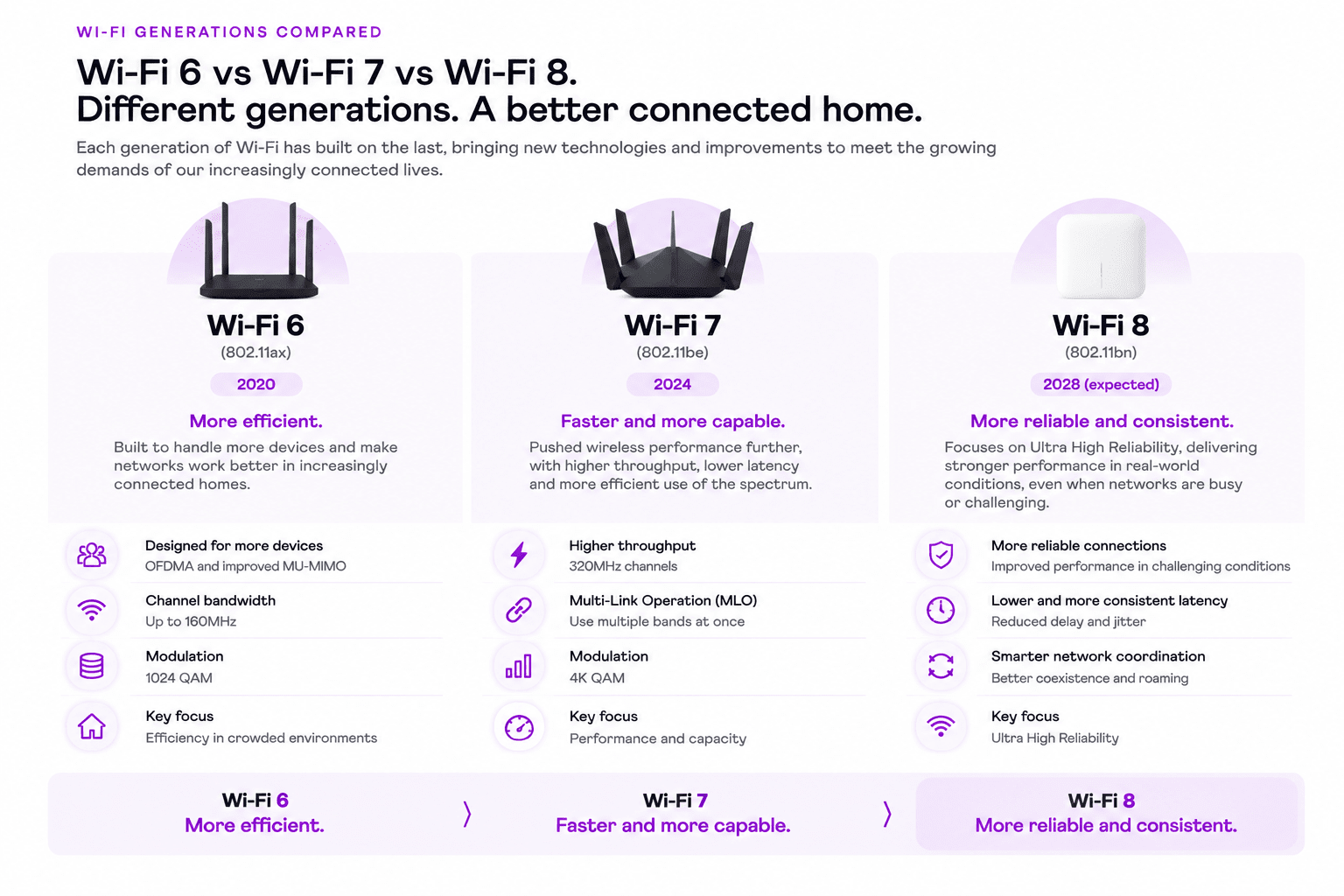
If you’re currently using Wi-Fi 6, you certainly aren’t alone. Wi-Fi 6 remains widely used across routers, smartphones, laptops and other connected devices, so Wi-Fi 8 may sound like we’ve suddenly skipped a generation.
In reality, each generation has been tackling a slightly different challenge.
Wi-Fi 6 was designed to make Wi-Fi more efficient as networks became increasingly crowded. Technologies such as OFDMA and improved MU-MIMO helped routers communicate with multiple devices more efficiently, increasingly important as households accumulated more phones, computers, TVs and smart-home devices.
Wi-Fi 7 pushed performance much further. It introduced technologies including 320MHz channels, 4K QAM and Multi-Link Operation (MLO), allowing compatible devices to use wireless spectrum more effectively and opening the door to significantly higher throughput and lower latency.
Wi-Fi 8 builds on those advances, but shifts the focus again. Rather than simply chasing another dramatic increase in theoretical peak speed, its defining goal is Ultra High Reliability.
That means improving what happens when conditions aren’t perfect.
Think about the places where Wi-Fi tends to struggle: the bedroom furthest from your router, a busy apartment building surrounded by neighbouring networks, moving between different access points, or a household where dozens of devices are communicating at the same time.
Those are exactly the kinds of real-world situations Wi-Fi 8 is being designed to improve.
A simple way to think about the progression is:
- Wi-Fi 6: Make busy networks more efficient.
- Wi-Fi 7: Make Wi-Fi significantly faster and more capable.
- Wi-Fi 8: Make that performance more reliable and consistent.
So if you’re currently using Wi-Fi 6, Wi-Fi 8 doesn’t suddenly make your existing network obsolete. But by the time Wi-Fi 8 becomes mainstream, moving from Wi-Fi 6 could represent several generations of improvements at once, spanning capacity, throughput, latency and reliability.
What Will Wi-Fi 8 Actually Improve?
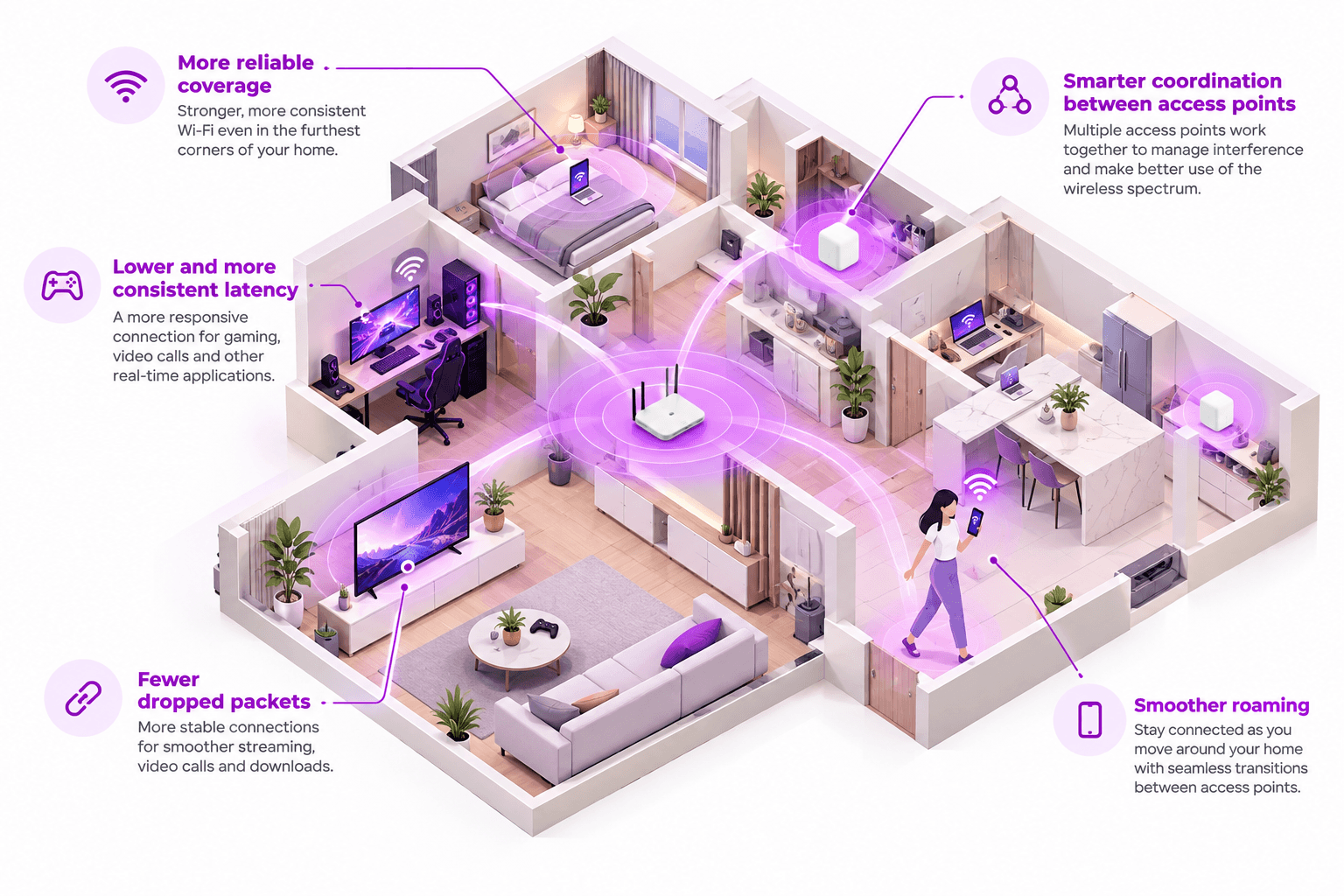
A number of technologies are being developed as part of 802.11bn to achieve Wi-Fi 8’s Ultra High Reliability goals. You probably won’t need to know their names when you’re buying a router, but together they could change how Wi-Fi behaves around the home.
More Reliable Coverage
One area of focus is performance at the edge of Wi-Fi coverage.
Wi-Fi speeds typically fall as you move further away from an access point or encounter obstacles such as walls. Wi-Fi 8 includes physical-layer improvements designed to maintain stronger, more reliable connections under these less-than-ideal signal conditions.
For users, that could mean more consistent performance in the parts of the home where Wi-Fi currently becomes less reliable.
Smarter Coordination Between Access Points
As homes and buildings increasingly use multiple access points or Mesh Wi-Fi systems, those access points need to share the available wireless spectrum efficiently.
Wi-Fi 8 is being designed with greater coordination between access points, allowing networks to manage interference and available resources more intelligently.
This could be particularly useful in environments such as apartment buildings, where your Wi-Fi isn’t just competing with devices inside your home. It’s sharing the airwaves with networks all around you.
Smoother Roaming
Walking around a home with multiple access points can require your device to transition from one access point to another. When those handovers aren’t seamless, they can result in brief interruptions or lost packets.
Wi-Fi 8 is targeting more reliable mobility between access points, helping devices maintain connectivity as they move through the network.
For most users, the best Wi-Fi experience is one where you never notice that transition happening at all.
Lower and More Consistent Latency
Average latency isn’t the whole story.
A connection that usually has low latency but occasionally suffers sudden spikes can still create noticeable problems for gaming, video calls and other real-time applications.
Wi-Fi 8 therefore isn’t just targeting lower latency. It’s also designed to make latency more predictable, particularly under challenging network conditions.
Fewer Dropped Packets
Data travelling across your network is broken into packets. When packets are lost, they may need to be retransmitted, which can contribute to delays, stuttering and inconsistent performance.
Reducing packet loss is one of Wi-Fi 8’s explicit reliability goals, particularly during transitions between access points.
The result of all these changes should be Wi-Fi that behaves more consistently — not only when conditions are perfect, but when they’re not.
TL;DR - What Wi-Fi 8 means for you
| Wi-Fi 8 improvement | What it means for you |
|---|---|
| More reliable coverage | More consistent Wi-Fi performance further from your router or access point |
| Smarter access point coordination | Better management of interference when multiple access points and neighbouring networks are present |
| Smoother roaming | More seamless connectivity when moving between access points |
| Lower, more consistent latency | Fewer sudden latency spikes during gaming, video calls and other real-time activities |
| Fewer dropped packets | Less data needing to be retransmitted, helping connections remain more stable |
Will Wi-Fi 8 Make Your Internet Faster?
Potentially. But probably not in the way you might expect.
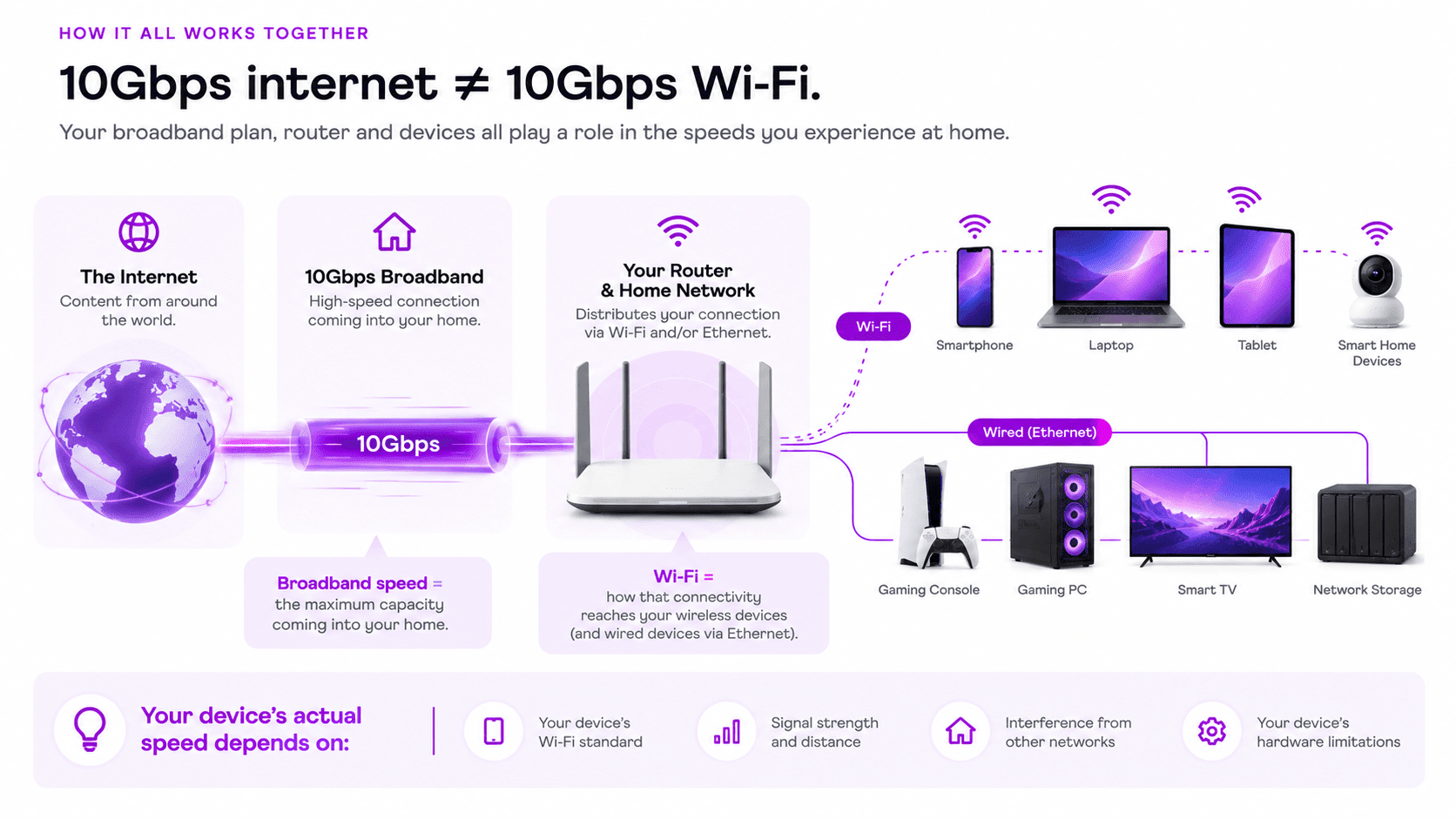
Your internet connection and your Wi-Fi network are two different things.
Your broadband plan determines how much internet bandwidth reaches your home. Your Wi-Fi network determines how that connection is distributed wirelessly to devices around it.
Upgrading to Wi-Fi 8 therefore won’t turn a slower broadband connection into a faster one.
Where Wi-Fi 8 could make a noticeable difference is in how efficiently and consistently your devices can use the connection you already have.
Imagine having a very fast broadband connection but a device located far from your router, surrounded by interference and competing with multiple other devices. The broadband connection itself may have plenty of capacity, but the wireless link becomes the bottleneck.
Wi-Fi 8 is being designed to improve performance in exactly these less-than-perfect situations.
So while peak speed may not be Wi-Fi 8’s headline upgrade, better real-world throughput, fewer retransmissions and more consistent connections could still make your internet feel faster.
What Devices Will Support Wi-Fi 8?
As with every new Wi-Fi generation, Wi-Fi 8 adoption is likely to happen gradually.
The first wave will require Wi-Fi 8-capable networking hardware, such as routers and access points, alongside client devices containing compatible Wi-Fi chipsets.
Over time, support can be expected to expand across categories such as smartphones, laptops, tablets and other connected devices as manufacturers introduce new hardware generations.
Gaming hardware, TVs, smart-home products and other devices may follow their own upgrade cycles, so don’t expect everything in your home to suddenly become Wi-Fi 8-capable at once.
It’s also worth remembering that Wi-Fi 8 is still under development. Until manufacturers announce specific products, claims about exactly which future phones, computers, consoles or other devices will support Wi-Fi 8 are speculation.
Will Your Existing Devices Work With Wi-Fi 8?
The good news is that upgrading your network doesn’t mean throwing out everything currently connected to it.
Backward compatibility and coexistence with legacy Wi-Fi devices in the 2.4GHz, 5GHz and 6GHz bands are part of the IEEE 802.11bn project requirements.
That means older compatible devices should still be able to connect to a Wi-Fi 8 network, although they won’t suddenly gain Wi-Fi 8 capabilities.
A Wi-Fi 6 device, for example, will continue operating according to the capabilities supported by that device rather than magically becoming a Wi-Fi 8 device because the router has been upgraded.
This is important for increasingly connected homes. Many devices, particularly smart home products, are kept for far longer than smartphones or laptops. A gradual transition allows newer Wi-Fi 8 devices to be introduced without requiring every connected device in the house to be replaced.
Wi-Fi 8 for Gaming, Streaming and Smart Homes
Technical improvements are useful, but what really matters is whether they make a difference to the things we actually do online.
Wi-Fi 8’s emphasis on reliability could become particularly relevant as homes simultaneously support gaming, high-quality streaming, remote work and growing numbers of connected devices.
| Use case | What matters | How Wi-Fi 8 could help |
|---|---|---|
| Gaming | Latency, packet loss, stability | More predictable latency and fewer dropped packets |
| Streaming | Consistent bandwidth and coverage | More reliable performance when the network is busy |
| Smart homes | Many simultaneous connections | Better coordination and performance in dense connected environments |
| Video calls / WFH | Stability and predictable latency | Fewer interruptions and more consistent real-time connectivity |
Gaming with Wi-Fi 8
For online gaming, raw bandwidth is only part of the equation.
Latency, packet loss and connection stability can matter just as much, and sometimes considerably more, than maximum download speed.
Wi-Fi 8’s focus on lower and more predictable latency, reduced packet loss and reliable connections under congested conditions could therefore be particularly useful for gamers using wireless connections.
It won’t eliminate every source of gaming latency. The game server, broadband connection, routing and physical distance to the server still matter. But it could reduce the Wi-Fi network itself as a source of inconsistency.
Streaming
Modern streaming can consume significant bandwidth, particularly with multiple high-resolution streams running simultaneously.
But buffering isn’t always caused by a lack of broadband speed. Weak Wi-Fi coverage, interference and network congestion can also affect how reliably that bandwidth reaches a TV, tablet or other streaming device.
By improving performance under challenging wireless conditions, Wi-Fi 8 could help make high-bandwidth streaming more consistent throughout the home. This is especially true when many other devices are online at the same time.
Smart Homes
The number of connected devices in our homes continues to grow.
Beyond phones and laptops, a network may need to support TVs, speakers, security cameras, appliances, sensors, hubs and other Internet of Things (IoT) devices — many of which remain permanently connected.
That puts a different kind of pressure on a home network. It’s no longer just about delivering high speeds to one or two devices. The network needs to manage many connections reliably and efficiently.
Wi-Fi 8’s emphasis on reliability, network coordination, peer-to-peer communication and performance in dense environments makes it particularly relevant to the increasingly connected home.
Should You Wait for Wi-Fi 8 Before Upgrading your network?
Probably not if your network needs an upgrade today.
Wi-Fi 8 is still some distance from widespread consumer adoption, and current Wi-Fi technologies aren’t suddenly going to become obsolete when it arrives.
If you’re experiencing poor coverage, using an ageing router or have recently upgraded to a faster broadband connection that your existing equipment can’t fully take advantage of, waiting years for the next Wi-Fi generation may not make much sense.
Wi-Fi 7 already provides substantial capabilities for today’s high-performance home networks, including very high throughput, Multi-Link Operation and access to the 6GHz band where available.
On the other hand, if your current setup already meets your needs, there’s equally little reason to upgrade simply because a newer standard exists.
The more useful question isn’t “Should I wait for Wi-Fi 8?”
It’s “Does my current network do what I need it to do?”
If the answer is yes, you can keep using it. If the answer is no, there are plenty of ways to improve your home network without waiting for Wi-Fi 8.
How to Build a Future-Ready Home Network Today
Future-proofing doesn’t mean trying to predict every device or Wi-Fi standard you’ll use five years from now.
It means building enough capacity and flexibility into your network that it can adapt as your needs change.
- Start With Your Broadband Connection
Your home network can only distribute the connectivity available to it. A higher-capacity broadband connection gives multiple users and devices more room to operate simultaneously and provides headroom as bandwidth demands increase.
- Choose Networking Hardware for Your Actual Needs
The newest standard isn’t automatically necessary for every household.
Consider how many devices you have, the size and layout of your home, where your router needs to be positioned and what you actually do online.
A household primarily browsing and streaming has very different networking requirements from one simultaneously running gaming PCs, 4K TVs, cloud-connected cameras and dozens of smart devices.
- Think About Coverage, Not Just Speed
A powerful router can’t deliver its best performance to a device that can’t receive a strong signal.
For larger homes or layouts where a single router struggles to provide consistent coverage, a Mesh Wi-Fi system or multiple access points can help distribute connectivity more effectively throughout the home.
- Don't Forget Wired Connections
Wi-Fi may keep improving, but Ethernet isn’t going anywhere.
Fixed high-performance devices such as gaming PCs, desktop computers and network storage can benefit from wired connections, while Ethernet can also provide backhaul between compatible Mesh nodes or access points.
A future-ready network doesn’t have to choose between wired and wireless connectivity. The strongest setups often use both.
- Plan for More Connected Devices
Think beyond the devices you own today.
Smart-home technology, connected appliances, cameras, wearables and emerging device categories mean the number of networked devices in a typical household is likely to keep growing.
Building a network with sufficient capacity, coverage and flexibility now can make it easier to accommodate those devices later.
Where Does 10Gbps Broadband Fit In?
Wi-Fi 8 and 10Gbps broadband solve two different parts of the connectivity puzzle.
A 10Gbps broadband connection provides a large amount of bandwidth to your home. Your router, Wi-Fi network, Ethernet connections and individual devices determine how that capacity is distributed and how much of it any particular device can use.
That distinction matters because connecting to 10Gbps broadband doesn’t mean every phone or laptop will suddenly achieve a 10Gbps Wi-Fi speed test. Device capabilities, Wi-Fi standards, signal strength, network conditions and hardware all affect real-world performance.
The advantage of having more broadband capacity becomes clearer when you look at the home as a whole.
Instead of asking whether one device can consume the entire connection, consider multiple people gaming, streaming, downloading large files, working from home and using connected devices simultaneously. A higher-capacity connection gives all of those activities more room to coexist.
As home networking technology continues to advance, increasingly capable Wi-Fi hardware can also make better use of multi-gigabit broadband connections.
That’s where 10Gbps broadband fits into future-proofing. You don’t need Wi-Fi 8 to benefit from 10Gbps broadband today, and Wi-Fi 8 won’t require a 10Gbps connection. But faster broadband and more capable home networking hardware can complement each other as the demands we place on our networks continue to grow.
