




- MyRepublic
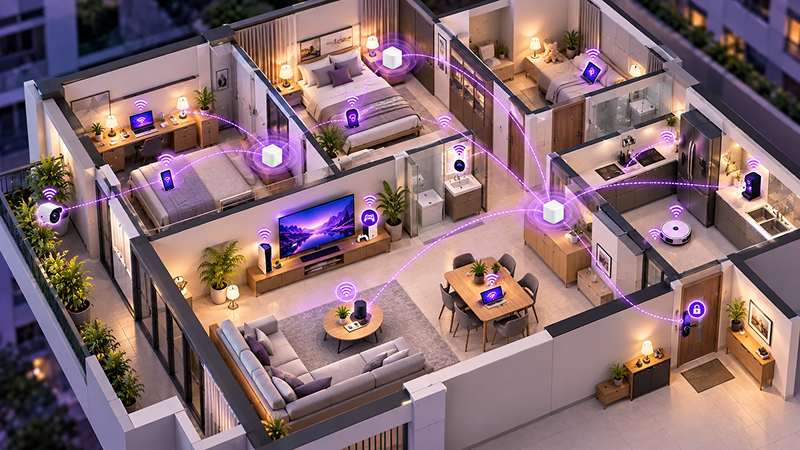
A smart home can start innocently enough. A smart TV here, a security camera there, perhaps a robot vacuum that somehow has a better sense of direction than everyone else in the house. Before long, dozens of devices may be sharing the same home network.
That makes your Wi-Fi an important part of any smart home system. As the number of connected devices grows, good coverage, network capacity and reliability become increasingly important. Don’t forget, your devices aren’t in one place, but scattered and spread around the home.
In this guide, we’ll look at how Mesh Wi-Fi can support a smart home, what Internet of Things (IoT) devices actually need from your network, and how to build a setup that can accommodate more connected devices over time.
What Is a Smart Home?
A smart home is a home containing connected devices that can be monitored, controlled or automated, often through apps, voice assistants or a central smart home platform.
Some smart home devices perform relatively simple jobs. A connected light bulb might let you switch the lights off from your phone, while a smart plug can turn an ordinary appliance on or off according to a schedule.
Others form part of a much larger smart home system, with multiple devices working together. Motion sensors might trigger lights automatically, a smart lock could interact with a security system, or connected air-conditioning controls could adjust temperatures based on occupancy.
Common smart home devices and appliances include:
- Smart lighting and switches
- Smart plugs
- Security cameras and video doorbells
- Smart locks
- Robot vacuums
- Smart TVs and speakers
- Connected air conditioners and fans
- Smart refrigerators and other appliances
- Sensors for motion, temperature, doors and windows
- Voice assistants and smart-home hubs
What makes these devices “smart” isn’t necessarily the appliance itself. It’s the connectivity that allows devices to communicate, receive instructions, share information or perform automated actions.
And that’s where IoT comes in.
What Is IoT and What Does It Have to Do With Your Smart Home?
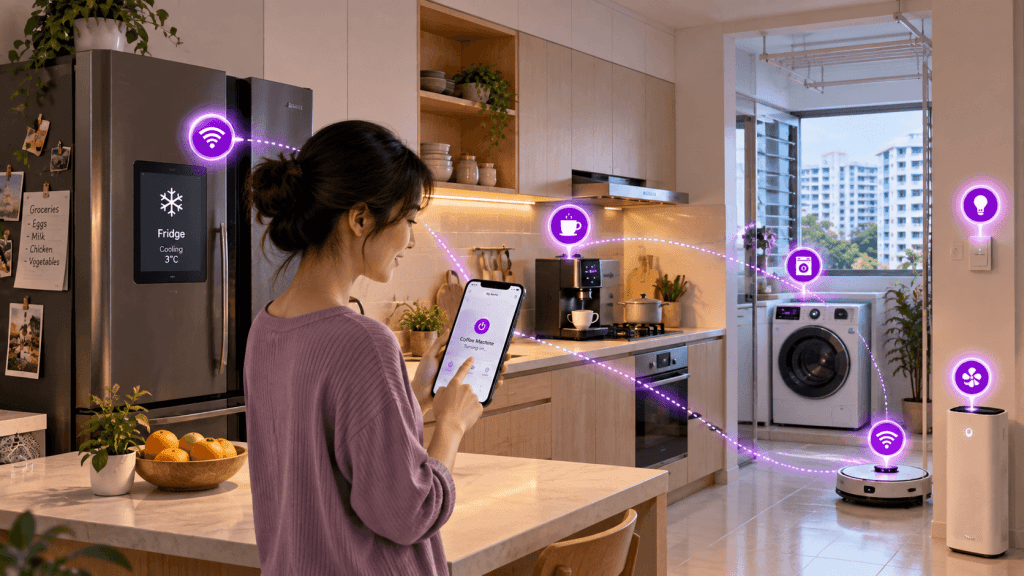
IoT stands for Internet of Things. It describes physical objects containing technology that allows them to connect, exchange data or interact with other systems.
So, what is IoT in everyday terms?
Instead of the internet connecting only traditional computing devices such as laptops and smartphones, the Internet of Things extends connectivity to objects around us.
Internet of Things examples around the home include a security camera sending footage to your phone, a robot vacuum reporting where it has cleaned, a smart air-conditioner that turns on or off on a planned timing, or a connected appliance sending a notification when a task is complete.
These are all IoT devices.
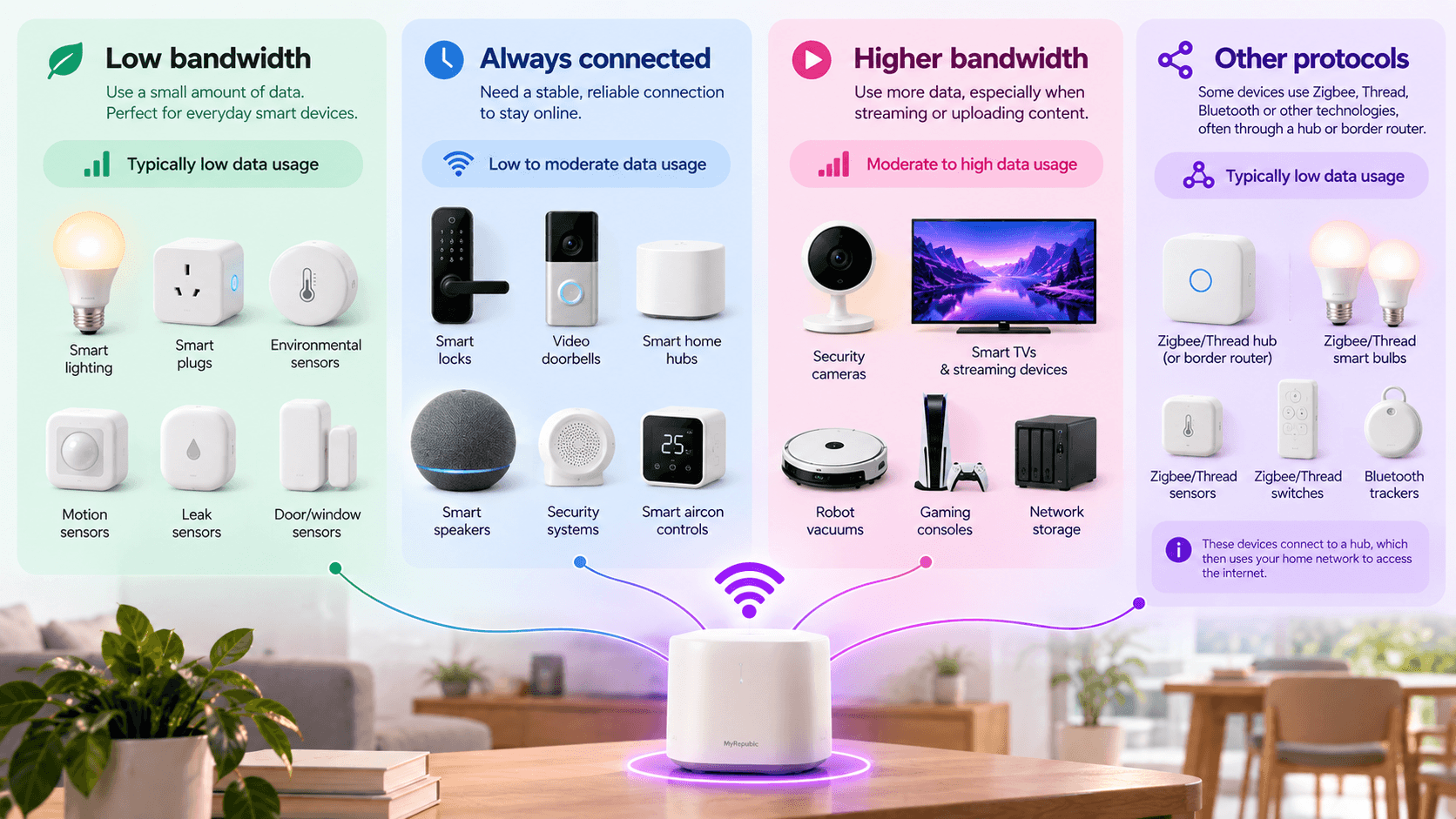
Not every IoT device necessarily connects directly to your Wi-Fi. Some smart home ecosystems use technologies such as Bluetooth, Zigbee, Thread or other protocols to communicate locally, sometimes through a hub or border router that then connects them to the wider home network.
But Wi-Fi still plays a major role in the connected home. Cameras, TVs, speakers, appliances, hubs and numerous other devices can all depend on your home network, alongside the standard phones, computers, consoles and tablets.
The challenge therefore isn’t simply getting one smart device online. It’s building a network capable of supporting the entire connected household.
Why Smart Homes Can Be Challenging for Traditional Wi-Fi
Adding another smart bulb isn’t suddenly going to overwhelm your broadband connection.
In fact, many smart home devices use relatively little bandwidth. Sensors and smart plugs, for example, may exchange only small amounts of data.
The challenge is scale, location and reliability.
A conventional router broadcasts Wi-Fi from one location. Devices close to it may have an excellent connection, while those separated by several walls or positioned at the opposite end of the home receive a weaker signal.
Smart homes can make those weaknesses more obvious because connected devices aren’t conveniently clustered around the router.
A security camera might be near your front door. A smart appliance could be in the kitchen. Sensors may be positioned throughout different rooms. A smart TV might be against the furthest wall of the living room.
Then add the devices that aren’t technically part of the smart home at all: laptops, phones, tablets, gaming consoles and everything else competing for connectivity.
The result is a network that needs to provide reliable coverage across more of the home and support more simultaneous connections.
That’s precisely where Mesh Wi-Fi becomes useful.
What Is Mesh Wi-Fi?
A Mesh Wi-Fi system uses multiple access points, commonly called nodes, positioned around the home to create a single wireless network.
Instead of relying on one router to reach every room, additional Mesh nodes extend coverage into areas where the signal from a single router may otherwise become weak.
The nodes work together as one network, allowing compatible devices to connect to the most appropriate access point as they move around the home.
This makes Mesh Wi-Fi particularly useful for larger homes, multi-storey properties and layouts where walls or distance make it difficult for a single router to provide consistent coverage.
For a more detailed explanation of how Mesh systems work, see our guide to What Is a Wi-Fi Mesh System and Should You Get One?.
For smart homes, however, the important part is simple: Mesh Wi-Fi gives you more opportunities to place strong wireless coverage close to the devices that need it.
Why Mesh Wi-Fi Makes Sense for Smart Homes
Mesh Wi-Fi doesn’t make a device smarter, nor does every smart home require a Mesh system.
Its advantage is providing the network foundation on which a growing collection of connected devices can operate.
Better Coverage Around the Home
Smart home devices can end up in some awkward places. Doorbells sit at entrances. Cameras may overlook corridors or balconies. Smart appliances live wherever the appliance needs to be rather than wherever the Wi-Fi signal happens to be strongest.
Multiple Mesh nodes can extend coverage closer to these locations instead of forcing every device to communicate with one distant router.
More Consistent Connections
Some smart devices need to remain connected continuously.
A temporary connection problem on your phone might simply mean refreshing a webpage. A security camera dropping offline or a smart-home hub losing connectivity can be considerably more inconvenient.
Strong, well-planned Wi-Fi coverage can help reduce areas where connected devices struggle to maintain a reliable connection.
Support for a Growing Number of Devices
Smart homes tend to grow. You may start with three connected devices and gradually add lights, cameras, speakers, appliances and sensors.
Meanwhile, everyone in the household continues adding phones, laptops, tablets and other devices of their own.
Modern Mesh systems are designed for environments containing many connected devices, helping distribute wireless connectivity around the home rather than concentrating everything around a single access point.
Easier Expansion
One of the useful characteristics of a Mesh network is its ability to scale with the home.
If coverage isn’t sufficient in a particular area, compatible systems may allow another node to be added rather than requiring the entire network to be redesigned.
That can be useful as your smart home system expands or your connectivity needs change.
Do Smart Home Devices Need Fast Internet?
Usually, not individually.
A smart light bulb doesn’t need a multi-gigabit internet connection to switch itself on.
Many IoT devices transmit relatively small amounts of data. What they often benefit from more is stable connectivity and sufficient coverage.
There are important exceptions.
Security cameras can generate continuous video traffic, particularly when using higher resolutions or uploading footage to cloud storage. Smart TVs can stream high-resolution video. Other connected entertainment devices may also consume substantially more bandwidth than sensors, switches or smart plugs.
The bigger consideration is therefore the household as a whole.
Your smart home network doesn’t exist separately from everything else. The same broadband connection may simultaneously support video streaming, gaming, large downloads, video calls, cloud backups and dozens of connected devices.
A faster broadband connection provides more total capacity for all those activities to happen at the same time, while your Wi-Fi system determines how effectively that connectivity reaches devices around your home.
How to Set Up a Smart Home Network
If you’re wondering how to set up a smart home, it’s tempting to start by choosing devices.
From a networking perspective, it’s better to start with the home itself.
Map Where Your Connected Devices Will Be
Think about where connectivity is actually needed.
Mark the locations of fixed devices such as TVs, security cameras, smart appliances, desktop computers and gaming systems. Then consider areas where mobile devices are regularly used.
This gives you a better picture of the coverage your network needs to provide.
Position Your Main Router Carefully
Whenever possible, avoid hiding your router inside cabinets or placing it in an enclosed corner surrounded by obstacles.
A relatively open location allows its wireless signal to propagate more effectively.
The position may be constrained by where your fibre connection enters the home, which is another reason Mesh nodes can be useful: they allow coverage to be extended beyond the location of the primary router.
Position Mesh Nodes Strategically
A common mistake is placing a Mesh node directly inside a Wi-Fi dead zone.
The node still needs a good connection back to the rest of the Mesh network.
Instead, place nodes between the main router and the area requiring better coverage. The objective is to create overlapping areas of strong connectivity rather than isolated islands of signal.
Use Ethernet Where It Makes Sense
Not everything needs to be wireless.
Fixed devices such as desktop PCs, gaming systems, TVs or network storage can benefit from Ethernet connections where practical.
Some Mesh systems also support wired backhaul, allowing nodes to communicate over Ethernet rather than using wireless capacity for the connection between nodes.
This can be particularly useful when planning networking during a renovation.
Keep Your Network Secure
Smart home devices add more endpoints to your network, so basic network security matters.
Use strong, unique passwords for your Wi-Fi and device accounts, install firmware updates when available, enable appropriate modern Wi-Fi security features supported by your equipment, and avoid leaving devices on default credentials.
It’s also worth periodically checking which devices are connected to your network. If you no longer use a smart device, remove it rather than leaving forgotten hardware permanently connected.
How to Remodel Smart Home Wiring: Do Smart Home devices need special wiring?
If you’re renovating your home, you have an opportunity that becomes much harder to recreate once the walls are finished: planning the infrastructure your future smart home may need.
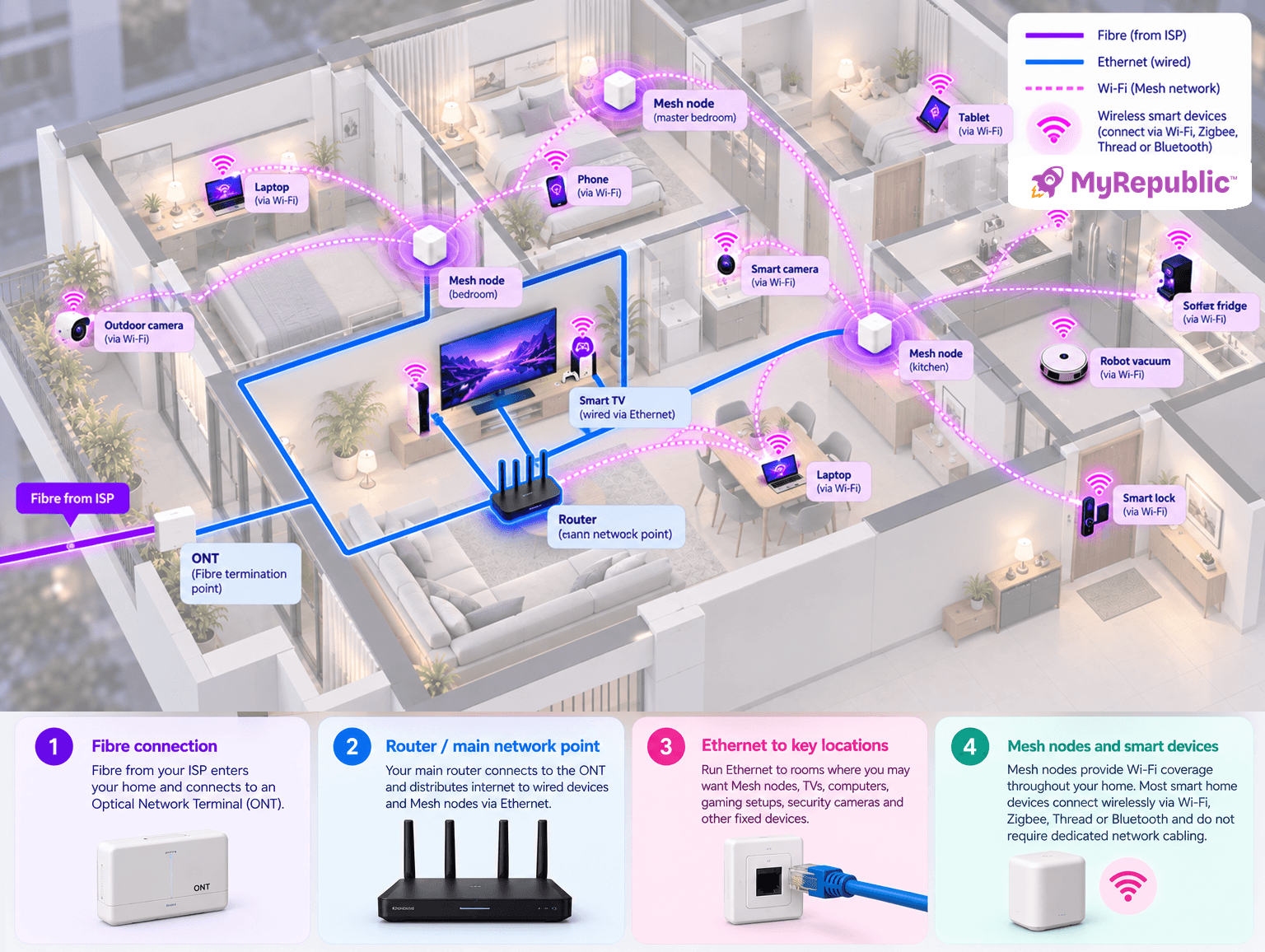
The good news is that most consumer smart home devices don’t require special wiring. Smart bulbs, sensors, locks and other IoT devices often communicate wirelessly using Wi-Fi, Zigbee, Thread or Bluetooth, while appliances generally use ordinary electrical connections.
However, there are still some things worth considering before electrical and renovation work is completed.
1. Plan Your Electrical Wiring
Some smart devices have specific power requirements. Smart wall switches, for example, may require a neutral wire depending on the product, while cameras, Mesh nodes, hubs and other equipment need conveniently located power.
If you already know which smart home system or devices you intend to install, check their electrical requirements before finalising your lighting circuits, switches and power points.
More advanced professionally installed home automation systems can also use dedicated control wiring. If you’re planning this type of system, it should ideally be designed alongside your electrical layout from the beginning.
2. Plan Your Network Cabling
Even in a largely wireless smart home, Ethernet can provide a useful wired backbone for devices that benefit from fast, stable connections.
Consider running Ethernet to locations where you may eventually want:
- Mesh nodes or wireless access points
- TVs and entertainment systems
- Desktop computers
- Gaming setups
- Security cameras
- Network-attached storage
- Smart-home hubs
- Home offices
Ethernet can also be used for wired backhaul between compatible Mesh nodes, allowing the Mesh system to use a wired connection to carry network traffic between access points.
3. Think About Where Your Networking Equipment Will Live
For larger renovations, consider creating a suitable location for networking equipment such as your router, network switch and smart-home hubs.
Make sure the area has sufficient power, ventilation and space for equipment you may add later. You should also consider where your fibre connection enters the home and how Ethernet cables will reach different rooms from your main networking location.
4. Build for Wireless Devices Too
You don’t need to run a network cable to every IoT device.
Many smart-home products are specifically designed to communicate wirelessly, either directly with your Wi-Fi network or through technologies such as Zigbee and Thread. In hub-based systems, individual devices may communicate wirelessly with the hub while the hub provides the connection to the wider home network.
The aim of smart home wiring therefore isn’t to hardwire everything. It’s to put the power, network cabling and connectivity infrastructure in the right places so your wired and wireless devices can work together.
If you’re renovating, planning that foundation before the walls are finished can give your smart home considerably more flexibility as your collection of connected devices grows.
What Are the Top Smart Home Upgrades?
The best smart home upgrades aren’t necessarily the ones with the most impressive specifications. They solve a genuine problem or automate something you regularly do.
| Smart home upgrade | What it can add to your home | Network consideration |
|---|---|---|
| Smart lighting | Remote control, schedules and automation | Usually low bandwidth; good coverage throughout the home matters |
| Security cameras | Remote monitoring and recording | Can require more bandwidth, particularly for multiple high-resolution cameras |
| Smart locks & doorbells | Access control and visitor monitoring | Reliable coverage around entrances is important |
| Smart speakers | Voice control, audio and automation | Benefit from consistent connectivity in frequently used rooms |
| Smart TVs & streaming devices | Connected entertainment and streaming | Higher-bandwidth usage makes strong Wi-Fi or Ethernet useful |
| Robot vacuums | Automated cleaning and remote control | Need reliable coverage across the areas they operate |
| Smart appliances | Remote monitoring, notifications and automation | Requirements vary significantly by appliance |
| Environmental sensors | Temperature, humidity, motion and other monitoring | Usually very low bandwidth but may rely on hubs or alternative wireless protocols |
The right upgrades depend on how you actually live.
Before buying a device simply because it can connect to the internet, ask what problem it’s solving and how it fits into the smart home ecosystem you’re building.
Planning a Smart Home in Singapore
Building a smart home in Singapore comes with some particular networking considerations.
Many households live in HDB flats or condominiums, where neighbouring Wi-Fi networks can be extremely close together. That means your wireless network may be sharing the surrounding spectrum with numerous other networks.
Walls, household layout and the position of the fibre termination point can also influence where a single router can provide strong coverage.
Larger HDB flats, maisonettes, condominiums and landed homes may particularly benefit from carefully planned Mesh Wi-Fi coverage rather than relying on one access point to reach the entire property.
The number of neighbouring networks also makes good network design increasingly important. Simply installing the most powerful router available doesn’t guarantee strong connectivity in every room.
Coverage, node placement, wired backhaul options and the capabilities of individual devices all play a role.
How to Build a Smart Home That Can Grow With You
You don’t need to buy every smart home device at once.
In fact, building gradually can make it easier to understand which automations and connected devices are genuinely useful to you.
Start with the network foundation. Make sure you have reliable broadband, good Wi-Fi coverage throughout the areas where connectivity is needed and sufficient network capacity for the household.
Then consider compatibility when choosing smart devices. Different products may use different platforms and communication technologies, so buying devices that work within compatible ecosystems can make your smart home easier to manage.
Finally, plan for growth.
Today’s smart home might contain ten connected devices. Tomorrow’s could contain considerably more.
A scalable Mesh Wi-Fi system, strategically placed wired connections and sufficient broadband capacity give you room to add new smart home appliances and IoT devices without having to rethink your network every time something new joins it.
Build the Network Behind Your Smart Home
A smart home is only as useful as the connections that allow its devices to communicate.
As more devices become connected, the challenge shifts from simply having Wi-Fi to having reliable Wi-Fi in the places where you actually need it.
Mesh Wi-Fi can help provide that foundation by extending coverage across the home and giving a growing collection of connected devices a more consistent way to access your network.
MyRepublic Mesh Wi-Fi plans are built for connected homes, combining high-speed fibre broadband with Mesh options that can help extend strong Wi-Fi coverage throughout your home.
Whether you’re building your first smart home setup or preparing for dozens of connected devices, start with a network that’s ready to grow with you and whatever you connect next.
Smart Home and Mesh Wi-Fi FAQs
A smart home contains connected devices that can be monitored, controlled or automated through technologies such as apps, voice assistants, sensors and smart-home platforms.
IoT, or the Internet of Things, refers to physical objects that use connectivity and technology to exchange information or interact with other devices and systems. Smart cameras, connected appliances, sensors and robot vacuums are common Internet of Things examples in the home.
Mesh Wi-Fi can be particularly useful in smart homes where devices are distributed across areas that a single router struggles to cover reliably. Whether you need Mesh depends on your home’s size, layout and existing Wi-Fi coverage.
Simply having many IoT devices doesn’t necessarily mean your Wi-Fi will become slow. Many use very little bandwidth. Performance depends on factors including the number and type of devices, wireless conditions, router capabilities, network traffic and how effectively your network manages simultaneous connections.
Mesh nodes should generally be positioned where they can maintain a strong connection to the rest of the network while extending coverage towards areas that need it. Putting a node directly inside an existing dead zone may give it too weak a connection to perform effectively.
No. Depending on the product and ecosystem, smart home devices can use Wi-Fi, Bluetooth, Zigbee, Thread and other communication technologies. Some connect through a hub or border router rather than connecting directly to Wi-Fi.
If you’re already renovating, installing Ethernet in useful locations can provide a strong foundation for fixed devices, access points and compatible Mesh systems. Even if some ports aren’t needed immediately, they can provide additional flexibility as your home network evolves.
There isn’t one broadband speed required for every smart home. Many IoT devices use very little bandwidth. Your overall requirement depends more on everything the household does simultaneously — including streaming, gaming, downloads, video calls, cameras and other connected devices — than on the number of smart bulbs or sensors alone.
