






- MyRepublic
Think your ISP is always to blame for your bad Wi-Fi connection?
Sometimes it’s true. But sometimes… it’s your microwave.
Or your neighbour.
Or your Christmas tree.
Or, somehow, a sack of potatoes.
Here are some of the weirdest (but completely real) things that can secretly mess with your Wi-Fi.
Let’s take a look at the usual suspects.
🚨 Suspect #1: You
“Sorry, but we’re starting with the prime suspect.”
These are things we’ve all accidentally done.
The good news? Most of these are surprisingly easy to fix.
1. Standing Between Your Device and the Router
Weirdness: This One’s on Physics.
Your body is made up of around 60% water, and water happens to be excellent at absorbing Wi-Fi signals. This is especially true on the faster 5GHz band. Simply standing between your phone or laptop and the router can weaken the connection.
Our Take: Congratulations. You have become the Wi-Fi dead zone. Try stepping aside or repositioning your router so it has a clearer line of sight.
2. Hiding the Router Behind Your TV
Weirdness: You Should’ve Seen This Coming.
Modern TVs are large, dense, and packed with metal and electronics. Tucking your router behind one blocks signal in exactly the direction you’re trying to use it.
Our Take: If your router is playing hide-and-seek behind the TV, don’t be surprised when your Wi-Fi loses too. Move it out into the open for a quick win.
3. Hiding Your Router Inside a Cabinet
Weirdness: Peak “Out of Sight, Out of Signal.”
We get it. Most routers aren’t exactly home décor. But hiding one inside a cabinet forces the signal to fight through wood, doors, furniture, and whatever else you’ve stored in there before it even reaches your devices.
Our Take: Your router doesn’t need privacy. It needs fresh air and a clear view of your home. Try placing it somewhere central and unobstructed.
4. A Basket of Fresh Laundry
Weirdness: Science Is Weird.
Dry clothes aren’t much of an issue, but a basket full of freshly washed towels or clothes is mostly water. Place it directly between your router and device, and it can noticeably weaken the signal.
Our Take: Imagine explaining that your Wi-Fi is being defeated by laundry. Maybe move the basket before your next video call.
5. Floor-to-Ceiling Bookshelves
Weirdness: You Did This to Yourself.
Books themselves aren’t a huge problem, but hundreds of them packed tightly together create a dense barrier that can weaken and scatter Wi-Fi signals.
Our Take: Your love for knowledge destroyed your Wi-Fi. Consider placing your router somewhere with fewer obstacles in between.
6. A Fish Tank
Weirdness: Certified “Wait, What?”
Aquariums are essentially giant tanks of water, and water is one of Wi-Fi’s biggest enemies. A large fish tank sitting between your router and your favourite gaming spot can noticeably reduce signal strength.
Our Take: Your fish are living their best lives. Your Wi-Fi… not so much.
7. A Jungle of Houseplants
Weirdness: Not Their Fault.
One plant won’t cause problems. Twenty large, water-filled plants packed together? That’s a different story. Water-rich leaves can absorb Wi-Fi, especially when they’re directly in the signal path.
Our Take: Congratulations on your indoor rainforest. Your router isn’t as impressed. Spacing out your plants can help.
🏠 Suspect #2: Your House
Your house may literally be built to block radio waves.
From reinforced concrete to giant metal appliances, some of the biggest Wi-Fi obstacles aren’t things you added. They’re part of the structure itself.

8. Concrete Walls
Weirdness: Repeat Offender.
Concrete is dense, and when it’s thick, it can significantly weaken Wi-Fi signals. The more walls your signal has to pass through, the worse your connection gets.
Our Take: Great for keeping your home sturdy. Not so great for keeping your Wi-Fi strong. Tough luck for everyone in Singapore. Consider placing your router more centrally or investing in a mesh system.
9. Steel Reinforcement
Weirdness: Your House Has Betrayed You.
Many concrete walls and floors contain steel reinforcement bars. These act like a shield, blocking and reflecting Wi-Fi signals far more than plain concrete alone. The same goes for sliding doors with metal frames.
Our Take: It’s not just the wall, it’s what’s inside it. If your signal struggles between rooms, additional access points can help.
10. Metal Blinds or Metal Furniture
Weirdness: Hidden in Plain Sight.
Metal doesn’t absorb Wi-Fi, but it reflects radio waves extremely well. Filing cabinets, metal shelving, lockers and other large furniture can create weak spots where signals bounce around instead of travelling directly to your device. Aluminium blinds can reflect Wi-Fi signals, and even opening or closing them can change how signals travel around a room.
Our Take: Adjusting your blinds shouldn’t affect your internet… but here we are.
11. Your Fridge
Weirdness: Prime Suspect.
A large metal refrigerator is basically a giant radio reflector. If it’s sitting between your router and your device, it can create unexpected dead zones.
Our Take: Cold drinks, warm leftovers, and mysteriously weak Wi-Fi. We all need a fridge, but maybe choose between scrolling TikTok and choosing your midnight snacks.
12. Toilet Water Tank
Weirdness: We Wouldn’t Have Guessed Either.
The water tank behind your toilet can absorb Wi-Fi signals more than you’d expect. Bathrooms, in general, are surprisingly unfriendly to wireless signals.
Our Take: Your Wi-Fi dropping in the bathroom? Now you know why. Maybe accept that some places aren’t built for streaming.
13. Mirrors / Mirrored Wardrobes
Weirdness: Repeat Offender.
Large mirrors often have a metallic backing that reflects Wi-Fi signals, creating strange signal patterns and dead spots.
Our Take: Turns out your bedroom isn’t just reflecting your outfit. It may be bouncing your Wi-Fi around too. If possible, reposition your router of avoid placing it directly opposite large mirror.
14. Large Appliances
Weirdness: Surprisingly Common.
Washing machines, ovens, dishwashers. Anything large and metal can block or reflect Wi-Fi signals if it’s directly in the path.
Our Take: Your appliances are doing their jobs. Unfortunately, they’re also getting in the way of your Wi-Fi. Try to keep a clear path between your router and your devices.
👨👩👧👦 Suspect #3: Everyone You Live or Work With
Your Wi-Fi isn’t always slow. Sometimes it’s just busy.
Unlike the other suspects, this one isn’t about weird physics or hidden obstacles. It’s simply what happens when multiple people (and devices) are all trying to use the same network at once. Streaming, calls, uploads, downloads… it all adds up.
15. Baby Monitors
Weirdness: Repeat Offender.
Many baby monitors operate on the crowded 2.4GHz band, competing directly with your Wi-Fi for airtime.
Our Take: Keeping an eye on the baby is important. Just know your Wi-Fi might be sharing the workload. If possible, switch to a model that uses a different frequency—or just accept that nap time might also be lag time.
16. Bluetooth Devices
Weirdness: Surprisingly Common.
Bluetooth shares the same 2.4GHz frequency as Wi-Fi. A few devices are fine, but a house full of wireless earbuds, speakers, and gadgets can add congestion.
Our Take: One pair of earbuds? No problem. Ten devices all talking at once? That’s a different story. Try switching some devices to wired. Or at least stop pairing everything at once like it’s a tech convention.
17. Smart Speakers
Weirdness: Always Listening… and Using Wi-Fi.
Smart speakers constantly communicate with the network, especially when streaming music or responding to commands.
Our Take: They’re helpful, but they’re also quietly using your bandwidth in the background. Give your Wi-Fi a break and ask fewer existential questions.
18. Streaming & Downloads
Weirdness: Case Closed.
4K streaming, large game downloads, and software updates can quickly eat up bandwidth. More so if multiple people are doing it at the same time.
Our Take: Your Wi-Fi isn’t broken. It’s just being shared. If three people are streaming, one is downloading a game, and another is updating their laptop… your Wi-Fi is doing its best. Try staggering heavy usage, or negotiate a streaming schedule like civilised humans.
19. Video Calls
Weirdness: Peak Work-From-Home.
Video calls require a steady, high-quality connection. A few simultaneous calls can put noticeable strain on your network.
Our Take: If everyone’s on Zoom at once, your Wi-Fi is basically hosting a conference. Turning off video (yes, really) can help. Your colleagues will survive without seeing your face for five minutes.
🍕 Suspect #4: Food
You probably didn’t expect your lunch to be part of the investigation.
But between water-heavy ingredients, dense packaging, and the occasional unfortunate placement, food can sometimes get in the way of your Wi-Fi—literally.
20. Potatoes
Weirdness: This Sounds Made Up… But It’s True.
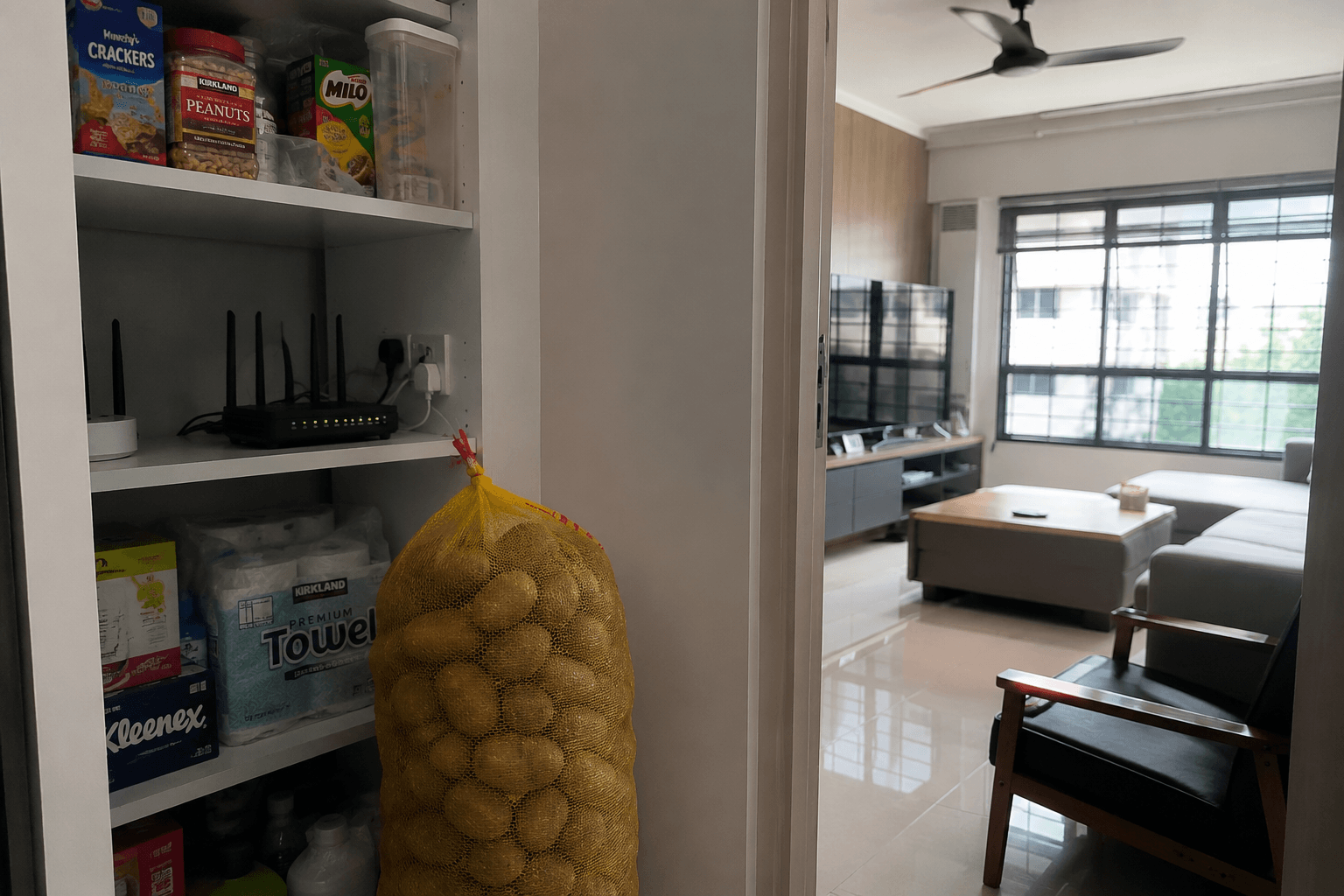
Potatoes are mostly water, and water absorbs Wi-Fi signals. A giant sack sitting between your router and your device can weaken the signal.
Our Take: We’re not saying rearrange your pantry for better Wi-Fi… but if this is your setup, you’ve unlocked a very niche problem.
21. A Stack of Pizza Boxes
Weirdness: LAN Party Problems.
Cardboard alone isn’t a big issue, but stack enough boxes, especially with hot, moisture-filled pizza inside, and you can create a temporary barrier that weakens signals.
Our Take: If your Wi-Fi slows down mid-party, it might be the pizza and not the people.
22. Using the Microwave
Weirdness: Repeat Offender.
Older or poorly shielded microwaves operate around 2.45GHz—the same frequency used by 2.4GHz Wi-Fi. When in use, they can cause noticeable interference.
Our Take: If your internet drops every time someone heats up leftovers, you’ve found your culprit.
23. Watermelon
Weirdness: Unlikely, But Possible.
Like potatoes, watermelons are mostly water. A single fruit won’t do much, but a large one placed directly in the signal path can technically weaken Wi-Fi.
Our Take: If your connection drops because of a watermelon, we have questions. But also… fair enough.
🎄 Suspect #5: The Holidays
24. Christmas Turkey
Weirdness: Seasonal Suspect.
A large, water-rich roast sitting directly between your router and your devices can absorb Wi-Fi signals, especially if it’s right in the signal path during a crowded holiday meal.
Our Take: Your Wi-Fi didn’t slow down. It got outnumbered by gravy and bad decisions.
25. Christmas Lights
Weirdness: We Wouldn’t Have Guessed Either.
Some cheaper LED string lights can generate electrical interference that affects nearby Wi-Fi signals, especially if they’re wrapped around or placed close to your router.
Our Take: Festive vibes are great. Just don’t decorate your router like it’s part of the tree.
🏘️ Suspect #6: Your Neighbours
You didn’t invite them onto your network, but their devices are still part of the equation.
In apartments and densely populated areas like Singapore, your Wi-Fi isn’t operating in isolation. It’s competing with dozens of other networks, signals, and devices all fighting for the same space.
26. Their Wi-Fi
Weirdness: Peak Apartment Living.
In high-density areas, dozens of routers can overlap on the same channels, causing congestion and slower speeds.
Our Take: It’s not personal, it’s just crowded. Try switching to a less congested channel or using the 5GHz band for better performance.
27. Their Cameras or Bluetooth Devices
Weirdness: Uninvited Guests.
Wireless security cameras and Bluetooth devices from nearby homes can add to the congestion, especially on an already crowded band.
Our Take: You can’t control your neighbours, but you can control your setup. Move your router away from shared walls and prioritise 5GHz connections where possible.
28. Apartment Density
Weirdness: Physics Meets Reality.
The more people and devices packed into a building, the more interference there is. Signals overlap, compete, and slow each other down.
Our Take: Sometimes it’s just the environment. If you’re in a dense building, consider upgrading to a mesh system or higher-performance router to cut through the noise.
🌦️ Suspect #7: Mother Nature
You can’t exactly move this one out of the way.
While most home Wi-Fi setups are protected from the elements, nature can still play a role. When signals travel longer distances or pass through outdoor environments, there’s a lot that’s not in our control.
29. Rain
Weirdness: The Jury’s Still Out.
For most indoor Wi-Fi, rain doesn’t make a noticeable difference. But for outdoor connections or long-distance wireless links, heavy rain can weaken signals by absorbing and scattering radio waves.
Our Take: So yes, your internet can slow down in the rain, but usually only in specific setups. Still, it’s nice to finally have an answer.
30. Trees
Weirdness: Nature Gets in the Way.
Trees, especially when dense or wet, contain a lot of water. That water can absorb Wi-Fi signals, particularly if the signal has to pass through them.
Our Take: That lush greenery outside your window might be blocking more than just your view. If you’re relying on outdoor signals, trees can definitely get in the way.
31. Large Plants
Weirdness: We’ve Seen This Before.
Just like indoor plants, large outdoor plants or clusters of vegetation can weaken Wi-Fi signals due to their water content.
Our Take: Turns out plants are consistent offenders, whether indoors or outdoors. If your signal path runs through a mini jungle, that might be your answer.
🤯 Suspect #8: "Wait... What?!"
This is where things get weird. Really weird.
These are the cases that sound completely made up, until you realise they’ve actually happened.
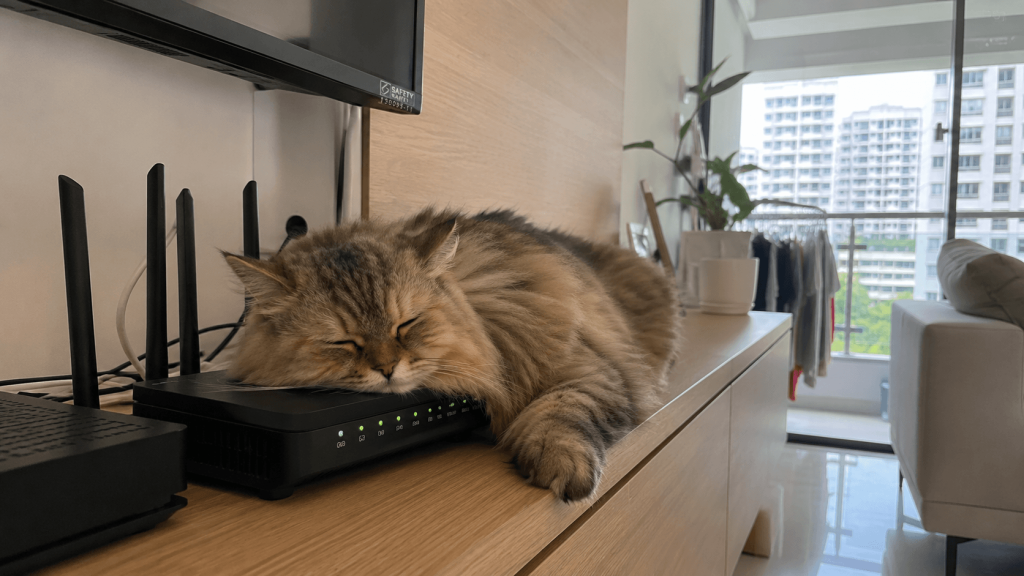
32. Your Cat Sleeping on the Router
Weirdness: Caught Red-Handed.
Cats love warm places, and routers happen to be one of them. While your cat isn’t interfering with Wi-Fi signals directly, sleeping on the router can block ventilation, cause overheating, or even nudge cables loose.
Our Take: The suspect is fluffy, adorable, and absolutely guilty. Try moving your router somewhere your cat can’t easily reach. Or give them a better (and warmer) spot to nap.
33. A Parked Van Outside
Weirdness: Hidden in Plain Sight.
If your router is near a window, a large metal vehicle parked outside can reflect or block signals in unexpected ways, changing how Wi-Fi travels into or out of your home.
Our Take: Someone’s delivery van is blocking your Wi-FI. If this happens often, try repositioning your router away from windows or adjusting its angle.
34. A Drone Hovering Nearby
Weirdness: Unlikely, But Possible.
Drones themselves don’t usually interfere with Wi-Fi, but live HD video transmissions can add congestion depending on the frequencies used, especially in crowded areas.
Our Take: If your Wi-Fi drops every time a drone flies past, you might be living in the future.
35. Large Flocks of Birds
Weirdness: This One’s on Physics.
For home Wi-Fi, this is negligible. But large groups of birds have been known to affect radar and long-distance radio systems by physically blocking or scattering signals.
Our Take: Probably not your everyday problem… but still one for the pub quiz. Thankfully, there’s nothing you need to fix here.
36. The 7 a.m. TV Mystery (Wales)
Weirdness: Case Closed.
A village in Wales experienced daily broadband outages at exactly 7 a.m. The culprit? One resident’s old TV emitting electrical interference every time it was switched on.
Our Take: Imagine being the person who accidentally took down the entire neighbourhood’s internet. If you suspect a device is causing interference, try turning things on and off one by one to isolate the issue.
37. The Lunchtime Slowdown (Office Edition)
Weirdness: Repeat Offender.
Some offices noticed Wi-Fi performance dropping every day around noon. The cause? Everyone using the microwave at the same time, flooding the 2.4GHz band with interference.
Our Take: Turns out lunch breaks can be hazardous to your internet.
38. The Christmas Office Outage
Weirdness: We Wouldn’t Have Guessed Either.
Some businesses have reported mysterious Wi-Fi issues that only appeared in December—until they realised decorative lights were causing interference.
Our Take: Holiday spirit: high. Wi-Fi performance: questionable. If your connection dips during festive season, try unplugging nearby lights or moving your router further away.
Final Thoughts on Weird Wi-Fi Moments
So… is your ISP always to blame?
Sometimes, yes.
But as you’ve seen, your Wi-Fi can be affected by everything from your furniture and appliances to your lunch, your neighbours, and even your cat.
The good news? Most of these issues are easy to fix once you know what to look for.
Need Better Wi-Fi at Home?
If you’re tired of playing detective every time your connection slows down, it might be time for a smarter solution.
With MyRepublic’s high-speed fibre plans mesh Wi-Fi systems, you get stronger, more reliable coverage throughout your home. Just beware of any weird obstacles in the way.
Explore MyRepublic plans and upgrade your Wi-Fi today.