




- MyRepublic
Shopping for a new Wi-Fi 7 router or trying to understand your existing one? You’ve probably come across terms like dual-band Wi-Fi 7 and tri-band Wi-Fi 7. Both promise the latest wireless technology, but what’s the actual difference?
The answer comes down to the frequency bands they use, and how those bands affect wireless speeds, coverage, congestion and device compatibility.
In this guide, we’ll break down dual-band vs tri-band Wi-Fi 7, explain what the extra 6GHz band does, and explore how each setup performs in everyday home environments.
What Are Wi-Fi Bands?
Wi-Fi bands are radio frequency ranges that routers use to communicate wirelessly with connected devices. The three main Wi-Fi bands are 2.4GHz, 5GHz and 6GHz, each offering different characteristics in terms of speed, range and interference.
Think of these frequencies as different roads that your wireless data can travel along. Some reach further, some accommodate faster traffic, and others are more prone to congestion.
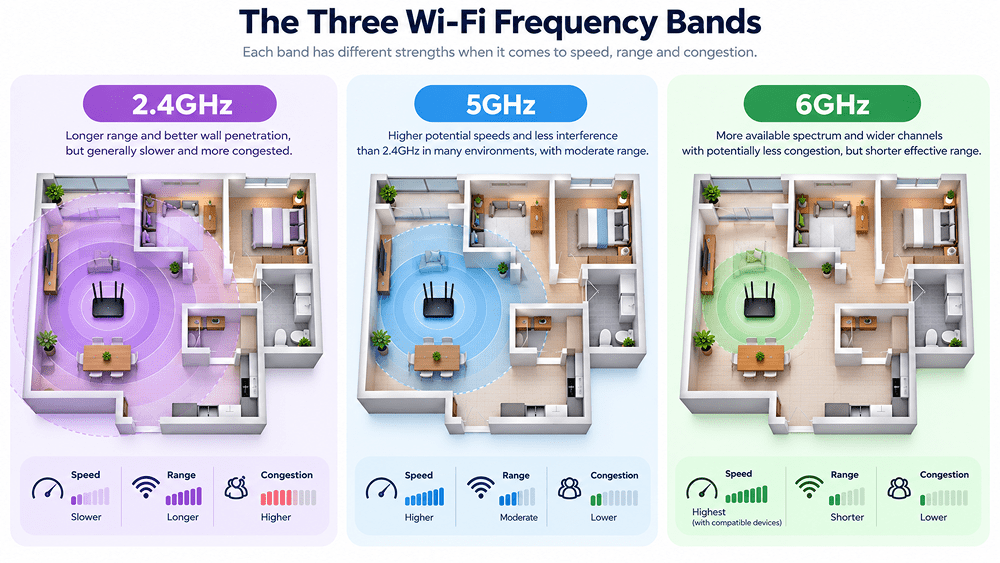
Modern home Wi-Fi commonly uses three frequency bands:
| Wi-Fi Band | Main Characteristics | Common Uses |
|---|---|---|
| 2.4GHz | Longer range, better wall penetration, but generally slower and more congested | Smart home devices, older gadgets, devices further from the router |
| 5GHz | Higher potential speeds, less interference than 2.4GHz in many environments, moderate range | Streaming, gaming, laptops, smartphones |
| 6GHz | More available spectrum, wider channels and potentially less congestion, but shorter effective range | Compatible high-performance devices, demanding wireless applications |
The important thing to understand is that higher frequency doesn’t automatically mean better Wi-Fi.
For example, 6GHz can offer excellent performance when you’re close to the router, but 2.4GHz may maintain a usable connection further away or through more walls.
This is especially relevant in Singapore, where concrete walls and apartment layouts can significantly affect wireless coverage
While these frequency bands aren’t new, Wi-Fi 7 introduces technologies that improve how devices use them. For a closer look at the standard itself, read our guide to how Wi-Fi 7 works and what’s new.
What Is Dual-Band Wi-Fi 7?
A typical dual-band Wi-Fi 7 router operates on two frequency bands:
- 2.4GHz
- 5GHz
Although it doesn’t include the 6GHz band, it can still benefit from Wi-Fi 7 technologies that improve wireless efficiency and performance.
These include features such as 4K-QAM (4096-QAM), which can transmit more information per symbol under suitable signal conditions, and Multi-Link Operation (MLO), which allows compatible devices to use multiple wireless links.
However, the exact features supported depend on the router’s hardware and implementation.
Dual-band Wi-Fi 7 isn’t simply Wi-Fi 6 with a different label. It uses the newer Wi-Fi 7 standard, even without access to 6GHz.
What Is Tri-Band Wi-Fi 7?
A typical tri-band Wi-Fi 7 router supports three frequency bands:
- 2.4GHz
- 5GHz
- 6GHz
The addition of 6GHz is the main distinction.
This band provides access to additional wireless spectrum and supports channel widths of up to 320MHz, twice the maximum 160MHz channel width commonly available on 5GHz Wi-Fi 7 connections.
Wider channels can carry more data at once, potentially increasing wireless throughput for compatible devices.
The 6GHz band can also experience less congestion because older Wi-Fi devices that don’t support 6GHz cannot connect to it.
However, there are trade-offs. The higher-frequency signal generally doesn’t travel as far or penetrate obstacles as effectively as lower-frequency Wi-Fi signals.
And importantly, a device must support 6GHz to use that band. A tri-band router won’t magically upgrade an older laptop or smartphone.
Dual-Band vs Tri-Band Wi-Fi 7: Key Differences
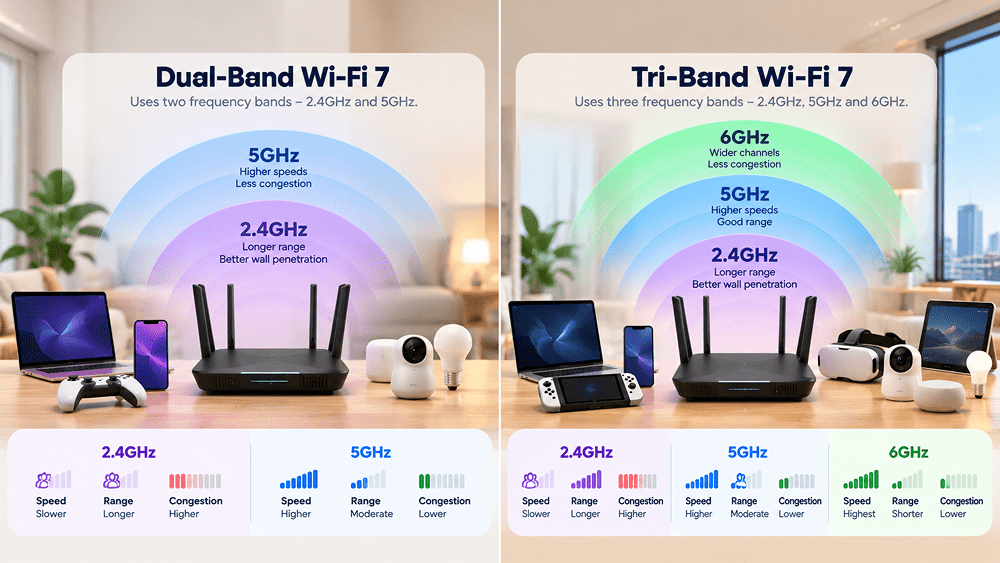
So, how do dual-band and tri-band Wi-Fi 7 compare when it comes to performance?
| Feature | Dual-Band Wi-Fi 7 | Tri-Band Wi-Fi 7 |
|---|---|---|
| Frequency bands | Typically 2.4GHz and 5GHz | Typically 2.4GHz, 5GHz and 6GHz |
| Maximum channel width | Typically up to 160MHz | Up to 320MHz on 6GHz |
| Potential wireless speeds | High, depending on router and device capabilities | Potentially higher with compatible 6GHz devices |
| Network congestion | Shares the established 2.4GHz and 5GHz bands | Additional 6GHz spectrum provides more room for compatible devices |
| Wireless range | 2.4GHz offers longer reach; 5GHz balances speed and coverage | Includes the same lower bands, while 6GHz generally has shorter reach |
| Device compatibility | Supports compatible 2.4GHz and 5GHz devices | Also supports 6GHz-capable devices |
| Multi-Link Operation | Can support MLO across available links | Can support MLO with additional band combinations |
| Router cost | Generally more affordable | Generally more expensive |
It’s worth remembering that these are differences in capability, not guaranteed performance.
A well-designed dual-band Wi-Fi 7 router can outperform a poorly positioned or lower-specification tri-band router in certain situations.
Likewise, a tri-band router’s additional capabilities only matter when the connected devices and environment can take advantage of them.
Does Tri-Band Wi-Fi 7 Mean Faster Internet Speeds?
Not necessarily. Tri-band Wi-Fi 7 can provide higher potential wireless speeds, but it doesn’t increase the speed of your broadband connection.
One of the biggest misconceptions about tri-band Wi-Fi 7 is that having three frequency bands automatically makes your internet connection faster.
In reality, there are two different things to consider:
Internet speed is the speed delivered by your broadband connection, while Wi-Fi speed is the speed at which data travels wirelessly between your router and connected devices.
A tri-band router doesn’t increase the speed of your broadband plan. What it can do is provide more wireless capacity and potentially higher speeds between compatible devices and the router.
Why the 6GHz Band Matters
One of Wi-Fi 7’s most significant performance features is support for 320MHz channels on 6GHz.
A wider channel can carry more data, much like adding lanes to a highway.
However, achieving higher speeds also depends on several factors:
- Device compatibility: Your laptop, smartphone or other device must support 6GHz and the relevant channel widths.
- Distance: Performance generally decreases as you move further from the router.
- Obstacles: Walls, doors and furniture can weaken wireless signals.
- Interference: Nearby wireless networks and electronic devices can affect performance.
- Router specifications: Antenna configurations, spatial streams and hardware capabilities also influence speed.
For example, a laptop that only supports 5GHz won’t suddenly achieve 6GHz speeds just because it’s connected to a tri-band Wi-Fi 7 router.
What About 10Gbps Broadband?
The distinction becomes especially important with high-speed broadband connections such as 10Gbps fibre.
Having 10Gbps broadband doesn’t mean every wireless device will achieve 10Gbps speeds.
Individual Wi-Fi speeds depend on the router, client device, wireless conditions and available network capacity.
Even with tri-band Wi-Fi 7, reaching the full speed of a 10Gbps connection on a single wireless device isn’t something you should automatically expect.
The broadband connection and the wireless network are two different parts of the overall experience.
For example, MyRepublic’s broadband plans offer 10Gbps connectivity with different router options. However, the wireless speeds experienced by individual devices still depend on their capabilities and the home network setup.
Does Tri-Band Wi-Fi 7 Improve Wireless Coverage?
Here’s another common misunderstanding: more Wi-Fi bands don’t necessarily mean greater coverage.
A tri-band router adds another frequency band, but that doesn’t automatically extend how far its signal reaches. In fact, 6GHz generally has a shorter effective range than 5GHz or 2.4GHz, particularly when walls and other obstacles are involved.
Why Frequency Affects Coverage
Lower-frequency radio signals generally travel further and penetrate obstacles more effectively than higher-frequency signals, assuming comparable transmission conditions.
This means:
- 2.4GHz is often useful for devices further from the router.
- 5GHz provides a practical balance between performance and coverage.
- 6GHz is best suited to compatible devices with a sufficiently strong signal.
What does this difference in Wi-Fi bands mean for Singapore homes?
Imagine a typical HDB flat with the router placed in the living room.
A smartphone connected to 6GHz may enjoy excellent wireless performance nearby. However, moving into a bedroom separated by several concrete walls could weaken that connection considerably.
The same device might achieve a more stable connection on 5GHz or even 2.4GHz, depending on the distance and layout.
This doesn’t mean tri-band Wi-Fi 7 has poor coverage. It simply means the additional 6GHz band serves a different purpose.
For larger homes or layouts with difficult-to-reach rooms, router placement and mesh Wi-Fi systems may have a greater impact on overall coverage than the number of frequency bands alone.
How Does Multi-Link Operation Work With Dual-Band and Tri-Band Wi-Fi 7?
One of the headline features of Wi-Fi 7 is Multi-Link Operation (MLO).
Traditionally, Wi-Fi devices generally communicate over one wireless link at a time.
MLO allows compatible Wi-Fi 7 devices to establish and use multiple links, potentially improving throughput, latency or connection reliability.
Think of it as having more than one route available for wireless traffic, rather than relying entirely on a single road.
MLO on Dual-Band Wi-Fi 7
On a dual-band Wi-Fi 7 router, MLO can operate using available links on the 2.4GHz and 5GHz bands, provided both the router and client device support the relevant configuration.
This can offer advantages in certain network conditions, even without 6GHz.
MLO on Tri-Band Wi-Fi 7
A tri-band Wi-Fi 7 router provides additional possibilities because it also supports 6GHz.
Compatible devices may be able to use different combinations of available bands, depending on their capabilities and the router’s implementation.
For example, a device might use links on 5GHz and 6GHz.
However, MLO doesn’t always mean two bands are simultaneously combined to double your speed. Different MLO operating modes work differently, and real-world improvements depend on device support, configuration and wireless conditions.
The takeaway? MLO is a Wi-Fi 7 feature, not something exclusive to tri-band routers.
Wi-Fi technology is continuing to evolve, too. While Wi-Fi 7 introduces improvements such as MLO, the upcoming Wi-Fi 8 standard places greater emphasis on connection reliability and performance in challenging wireless environments.
Dual-Band vs Tri-Band Wi-Fi 7: Understanding the Differences
The biggest difference between dual-band and tri-band Wi-Fi 7 is straightforward: tri-band adds the 6GHz frequency band, providing additional wireless spectrum and access to wider channels for compatible devices.
That can translate into higher potential wireless speeds and less congestion, particularly in environments where 6GHz connections perform well.
Dual-band Wi-Fi 7, meanwhile, still supports important features of the newer standard and can deliver excellent performance using 2.4GHz and 5GHz.
Neither configuration guarantees faster internet speeds, better coverage or lower latency in every situation.
Ultimately, the choice between dual-band and tri-band Wi-Fi 7 comes down to your household’s needs. Dual-band Wi-Fi 7 can deliver excellent performance for everyday browsing, streaming and gaming, while tri-band Wi-Fi 7 offers additional capacity and performance potential for homes with compatible devices and more demanding wireless requirements.
The best Wi-Fi setup isn’t necessarily the one with the most bands, but the one that matches your devices, home layout and how you use the internet.
Frequently Asked Questions About Dual-Band and Tri-Band Wi-Fi 7
However, gaming performance also depends on latency, interference, router placement and the internet connection itself. Tri-band isn’t an automatic guarantee of lower ping.
Older devices that don’t support 6GHz simply won’t use that frequency band.
Its benefits extend beyond maximum internet speed, including improvements in wireless efficiency, capacity and latency under suitable conditions.
You don’t need a 10Gbps broadband plan to use Wi-Fi 7, and having a 10Gbps plan doesn’t automatically mean you need tri-band Wi-Fi 7.
