





- MyRepublic
If you’ve ever shouted “WHY AM I LAGGING?!” at your screen, chances are you’re actually talking about latency.
But what is latency, really? What’s the actual latency meaning? And more importantly, how do you fix or reduce latency when it starts ruining your ranked match?
Let’s break it down properly.
TL;DR (For The Impatient Gamer)
- Latency definition: The time it takes for data to travel from your device to a server and back.
- Measured in milliseconds (ms).
- Lower = better.
- Bandwidth ≠ latency.
- To reduce latency: go wired, optimise routing, enable QoS, avoid bad VPNs, and use a properly optimised fibre broadband network.
What Is Latency? (A Simple Definition)
Let’s start with the basic latency definition.
Latency is the amount of time it takes for a packet of data to be sent from your device to its destination (like a game server,) and back to you.
It’s measured in milliseconds – that’s 1 thousandth of a second – abbreviated “ms”. In other words, 1ms is 0.001s. That’s really really fast.

So when someone asks “what is latency?”, the simplest answer is: It’s the delay between your action and the server responding.
Click mouse → signal travels → server processes → response comes back.
That round trip time = latency.
For example, on the MyRepublic GAMER network, the network latency for Singapore-hosted games like PUBG and Fortnite servers is somewhere between 1.2ms and 1.4ms. That’s so fast humans can’t notice the difference.
The further away the game server is located from you, the longer the time it takes for a packet of data to get there and back. On the MyRepublic GAMER network, the latency for a Fortnite server in Australia for instance, not too far from Singapore in terms of a holiday destination but definitely further if you’re talking about distance, is between 170ms and 180ms.
Ping vs Latency vs Lag
These terms get mixed up all the time.
- Latency = the actual delay (measured in ms)
- Ping = the tool used to measure latency
- Lag = what you feel when latency is too high
If your ping reads 8ms, your latency is 8ms. If it reads 180ms, you’re going to feel it.
If you want a deeper breakdown of how these terms differ, check out our detailed guide on Lag, Ping, and Latency.
Latency vs Bandwidth (They’re Not The Same Thing)
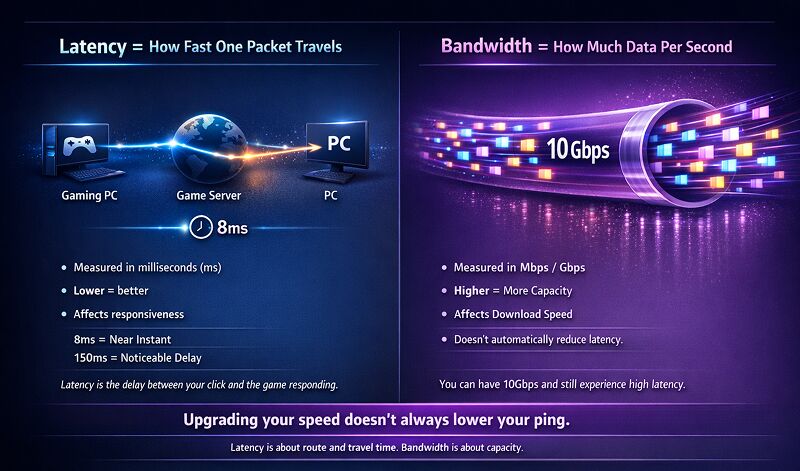
One of the biggest misconceptions in gaming: “Bro I upgraded to 10Gbps, why am I still lagging?”
Bandwidth refers to how much data you can transfer per second (Mbps or Gbps).
Latency refers to how fast a single piece of data completes its round trip.
Think of bandwidth as the size of your internet pipe. Think of latency as how long one drop of water takes to travel through it.
You can have a very big pipe (10Gbps), but if the route is long or congested, the drop still takes time. That said, insufficient bandwidth can cause congestion, which can increase latency.
As you can see, while both concepts point towards speed, latency is a measurement of the time taken to do the action while bandwidth has to do with the maximum amount of much data that can be moved over a standard unit of time e.g. one second.
Both of these things are important to making sure your online experience is a good one.
What Is Good Latency for Gaming in Singapore?

Now that you know what latency is, it should be obvious latency is better the closer it gets to 0ms i.e. the smaller the value the better.
When it comes to gaming, latency usually refers to how long it takes for your input (e.g. you pushing a button or clicking your mouse) to be registered by the game server and then back to your computer. Latency that is too high causes a noticeable and disruptive delay: the much dreaded experience we know as lag.
How low should your latency be? It really depends on what game you’re playing and where that game’s server is located.
Here’s a realistic 2026 benchmark:
- 1–5ms → Same-city servers (excellent)
- 5–20ms → Regional servers (very good)
- 20–50ms → Still very playable
- 50–100ms → Noticeable in competitive FPS
- 100ms+ → You will feel delay
- 150ms+ → Cross-continent territory
Because Singapore is geographically small but globally connected, your latency mostly depends on where the game server is located.
Example scenarios:
- SG to SG server → <5ms
- SG to Japan → ~60–90ms
- SG to US West Coast → ~150–180ms
Physics still applies in 2026. Distance matters.
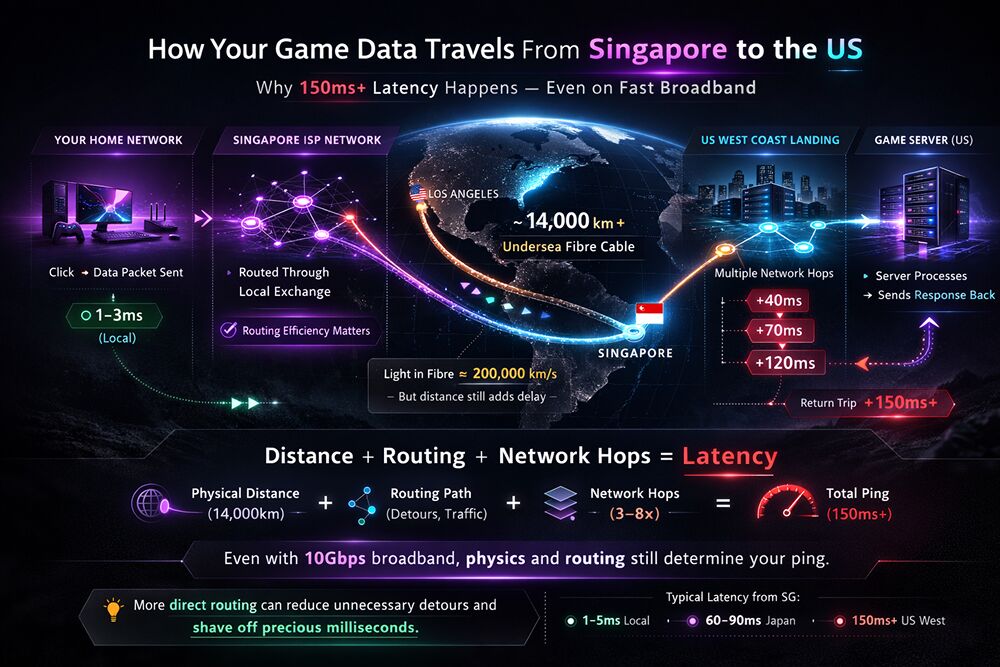
However, distance isn’t the only factor. The efficiency of your ISP’s network routing also plays a major role. Two gamers connecting to the same overseas server can see different latency numbers depending on how directly their traffic is routed. Well-optimised, custom network routing can shave off precious milliseconds by avoiding unnecessary detours and congested international paths.
What Actually Causes High Latency?
Now we move from “what is latency” to “why is my latency bad?”
Here are the main causes:
- Distance to Game Server - Data travelling thousands of kilometres through undersea cables takes time.
- Poor Network Routing - Your ISP determines the path your traffic takes. Longer or inefficient routing increases latency.
- Network Congestion (At Home) - If someone is streaming 4K, torrenting, or uploading massive files, your gaming packets compete for space.
- Wi-Fi Interference - Walls, neighbouring routers, microwaves. Yes, all these things really can cause unstable latency spikes.
- VPN Detours - VPNs change your routing. Sometimes better. Often worse.
How To Fix Latency (And Reduce It Properly)
You know the old saying: video games don’t make people violent, lag does. So, if you’re here because you’re wondering how to reduce latency, here’s the actionable part.
Going wired is one way to improve your latency
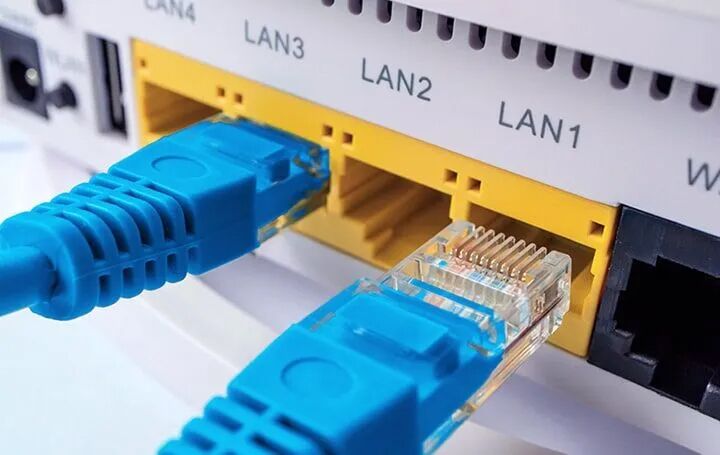
A direct cable or LAN connection is your safest bet for consistent latency. As many a passionate hardcore gamer will tell you: why the frell are you gaming over Wi-Fi?
Now, it’s not impossible to get good latency over Wi-Fi, especially with newer routers that have Wi-Fi 7, but a wired connection still wins for competitive gaming..
One of the key issues of using a Wi-Fi connection is wireless interference, which can result in lag if Wi-Fi signals get disrupted by other devices (such as your neighbour’s router) using the same frequency band.
The strength of Wi-Fi signals can be also hampered by distance (especially if they have to travel upwards) and physical obstacles (such as walls). A spotty wireless connection is not only bad for download speeds but also for latency.
Optimise Your Home Network Setup
Since fibre broadband is already standard in Singapore, the real difference comes from how well your home network is configured.
Focus on:
- Using a modern router that can handle high traffic loads
- Placing your router centrally (if on Wi-Fi)
- Avoiding overcrowded Wi-Fi channels
- Ensuring your firmware is updated
Even with fast fibre, a poorly configured home setup can still cause latency spikes.
Enable Quality of Service (QoS)

You may be familiar with this scenario: you’re trying to have a good time playing your game online when the latency starts spiking and it starts lagging. Leaving your room to investigate, you discover that your family members are downloading large torrent files and/or streaming 4K video. They’re using up all the bandwidth!
Or more specifically, as explained previously, they’re using enough bandwidth that it’s causing congestion in your home network: your bytes of gaming data, although small, cannot quickly make it through the pipe that is your home’s bandwidth as other kinds of internet traffic are getting in the way.
Thankfully, many routers today come with a feature known as Quality of Service (QoS), which basically helps you customise which kind of data traffic gets priority to your router. Gaming-focused routers such as the ASUS ROG BE25000 may refer to its QoS feature by special names such as “Game Boost.” It’s basically QoS that gives gaming traffic the highest priority to the router. This is yet another way to improve latency.
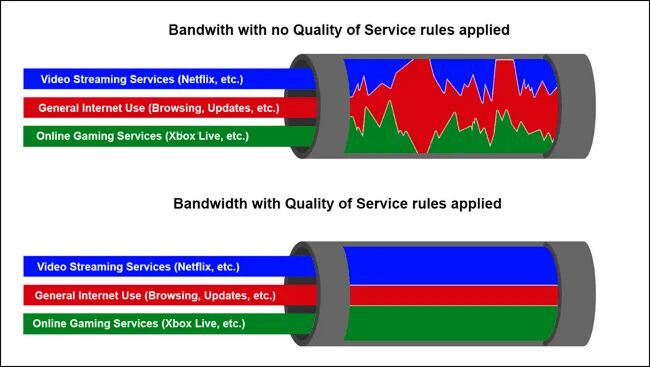
QoS lets you prioritise:
- Gaming traffic
- Specific devices
- Specific applications
This prevents Netflix in 4K from ruining your ranked match.
Be Careful With Gaming VPNs (GPNs)
It makes sense to use VPNs for their privacy and security features but there are quite a few VPNs for games, marketed as GPNs or Gamers Private Networks, that claim to lower latency for your online games. True? Well, it really depends on your Internet Service Provider (ISP).

Using a VPN or GPN basically changes the route your traffic takes across the internet from the ISP’s own network routing, routing it through the VPN servers instead. It’s like driving a car to a destination and deciding to take detour instead of the default route.
Logically, using a VPN makes sense only if your ISP’s routing isn’t good. If your game data already takes the most direct and fastest route to your online game server, using a VPN can hurt your latency. If the VPN’s server you’re using doesn’t have enough bandwidth, the congestion can also lead to higher latency.
If your ISP already provides optimised routing, adding a VPN might:
- Increase travel distance
- Introduce new congestion points
- Add encryption overhead
Always test before committing.
Upgrade Your Router (If It’s Ancient)
If you’re still using a 5+ year old router, CPU limitations can introduce bufferblot, while poor traffic handling increases spikes.
Modern routers with Wi-Fi 7 have better processing power to handle gaming traffic more efficiently.
How To Test Your Latency
In-Game Ping Display
Most online games show latency in the settings or scoreboard.
Trace Route Test
A useful tool when it comes to troubleshooting latency issues is the traceroute test. Like the ping test, running a traceroute shows you your latency numbers but (as its name suggests) it also shows you the route your data takes, and how the latency is affected at each part.
In the same command line window you used for the ping test type tracert followed by the IP address or the URL of the website you wish to check. For example, you could type “tracert example.com”.
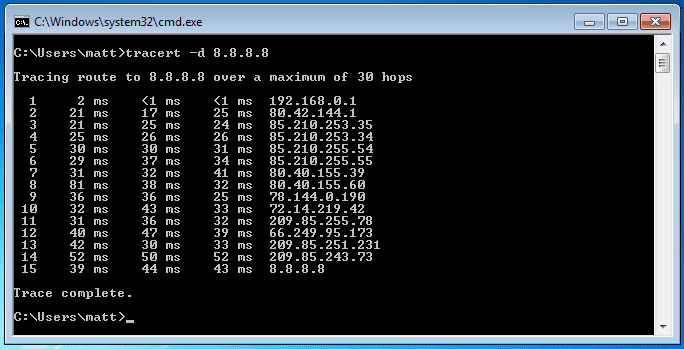
The list of numbers you see indicate the different places your data is going as it makes its way to its destination and how much latency it accumulates at each hop. This is really useful in determining what network issues are causing latency problems. If you’re facing such issues, your ISP will likely ask you to run a traceroute test.
Run A Ping Test (Windows)
- Press Start
- Type cmd
- Enter: ping example.com
You’ll see time values in ms. That’s your latency.
Finally…
Latency Reality Check: Does Your ISP Matter?
Yes. Because beyond bandwidth, what affects latency most is:
- Network routing quality
- Peering agreements
- Congestion management
- Gaming traffic optimisation
Two people on identical 10Gbps plans with different ISPs can experience very different latency results.
If you’re serious about competitive gaming, looking beyond just “bigger Mbps number” is key.
Final Thoughts on How to improve Latency for Gaming
Now you know:
- What latency is
- The proper latency meaning and the correct latency definition
- How to fix latency or how to reduce latency
Latency is like that one friend who’s always either early or late. You want it early. And ideally, consistently early.
Get Singapore’s #1 Broadband with Ultra-Low Latency for Streaming and Gaming
If you’ve optimised your setup and you’re still seeing higher latency than you’d like, it might be time to look at what’s happening beyond your home, at the network level.
Our GAMER broadband plans are built with custom network routing designed to optimise paths to popular game servers, helping reduce unnecessary detours and congestion. If you’re chasing lower ping, smoother ranked matches, and faster game downloads, you know where to go.
Because when milliseconds matter, your network should work as hard as you do.


